


What is Bill of Materials Inventory Management

BOM inventory management to the use of using your product recipes to manage and control your inventory — ideally by automating the process with software that handles Bills of Materials.
As you may already know, your BOM is a document for defining what materials are needed to create a product, as well as the manufacturing steps to assemble the finished good. Without it, you’ll never be able to achieve consistent build quality during production runs, and onboarding new workers to manufacture a product will be difficult. And with your BOMs documented, whenever orders come in, you and your team know exactly how many items are needed to fulfill demand and ship orders.
Ultimately, using inventory management software with BOM management features means that whenever a sales order comes in or you create a manufacturing order, items are automatically committed to the order based on your BOMs.
Why Are Bill of Materials in Inventory Management Important?

When you’re a micro-manufacturer, having your Bill of Materials inventory management saved in your own head is fine.
But if you have ambitions to scale your production capabilities, being the gatekeeper to how your products are made won't scale. This is the exact moment that a Bill of Materials comes into play, as it will show the other manufacturers you bring into the fold exactly how to manufacture products and how the bits and pieces of a product relate to each other.
By creating a document that is easy for everyone to understand, you’ll have a system that teams can follow and use BOM data to figure out:
- Exactly how much material is needed for any production run
- Whether parts are available for what’s being made
- Shortages before they hold up production
- How to keep purchasing in line with manufacturing schedules
So, it goes without saying, a Bill of Materials in inventory management is absolutely essential for running a successful manufacturing business.
11 Key components of an effective BOM
Even though a Bill of Materials can come in all shapes and sizes, they do all follow a similar structure.
So, if you want to start creating your own Bill of Materials inventory management system, here are the 11 components you will need to figure out to get that done:
1. BOM level
The BOM level shows where a part or subassembly sits in the product hierarchy.
So, a finished product BOM level will look something like this:
- Level 0 — The final product
- Level 1 — Direct sub-assemblies
- Level 2 — The parts that make those subassemblies
So, to translate this into something more tangible, let’s imagine you’re a car manufacturer:
- Level 0 — The super cool hot rod you built
- Level 1 — The Engine
- Level 2 — The pistons and gaskets and whatever else makes an engine
With your levels clearly defined, this will enable your Bill of Materials system to calculate material needs to reach Level 0.
2. Part number
Every item should have a part number or SKU (Stock Keeping Unit), a unique ID, so your Bill of Materials system can easily identify what an item is and how it’s used in your products.
Some tools can create an SKU for you, or you can create your own, as it’s only useful for internal tracking. For example, let’s say you use nuts and bolts for building a product, you might have an SKU to separate your bolts by size, and in the system it might appear as:
- BOLT-M8-25
- BOLT-M8-30
This helps both you and the Bill of Materials system to easily understand which bolt exactly needs to be consumed.
3. Part name and description
SKUs are great for understanding what an item is, but they're not very intuitive to read.
Enter names and descriptions, which can be as detailed as you need them to be to make it easier for people to use a Bill of Materials for inventory management. Here you can add things like:
- Material type
- Dimensions
- Other important details
4. Quantity
In the case of things like bolts, it’s unlikely one will be enough to manufacture a product, and that little bolt is going to need hundreds of little friends, potentially.
The quantity will determine how many units are needed to make something, making inventory planning easier when getting ready for a production run.
5. Unit of measure (UoM)
Not all items are created equal — some come in parts, some in lengths, and others can be a liquid.
The UoM is going to help you track items in different measurements, such as:
- Pieces
- Kilograms
- Meters
- Liters
- Boxes
What this means in practical terms is that when you order a raw material that comes shipped as a batch measured in kilograms, you can instead track that delivery as pieces once it’s accepted and placed into storage.
6. Procurement type
Procurement types basically mean, “Where did this thing come from?”
Was it made in-house or purchased from a supplier? This helps whoever is reading the BOM inventory management document know where to source the item themselves if needed. If you’re using particularly good software, it can trigger purchase or manufacturing orders based on inventory levels.
7. Unit cost
Unit cost is important for analyzing the cost of manufacturing something, showing how much each part of a product costs (including shipping and handling fees).
Having this information helps you understand and calculate the total material cost for a finished product. Direct material cost is the sum of each part's quantity multiplied by its unit cost, added up across every component:
- Direct Material Cost = Σ (Quantity × Unit Cost), summed across all parts
Then you can calculate scrap and waste to account for materials lost during a production run, and add overhead costs to get a better understanding of the full cost per unit.
Here are the formulas that will help you do that:
- Adjusted Material Cost = Direct Material Cost × (1 + Scrap Rate)
- Total BOM Cost = Adjusted Material Cost + Labor Cost + Overhead/Shipping
This supports:
- Pricing
- Margin analysis
- Tracking profitability
For example, a garment BOM might include fabric, lining, zippers, buttons, and packaging. The system calculates the total cost by summing the costs of all components.
8. Subassemblies and work-in-progress (WIP)
For multi-step production, BOMs include subassemblies, which are built before the final product.
Subassemblies have their own BOMs. The main BOM lists the subassembly as a component and specifies the quantity needed. When the system sees this, it calculates demand for all parts in the subassembly.
Work-in-progress is tracked by recording which subassemblies have been partially or fully built. This setup shows the full production flow and helps coordinate schedules across all stages.
9. Phase or lifecycle stage
This shows the product’s current status, such as prototype, active production, phase-out, or discontinued.
Tracking the lifecycle helps teams use the correct BOM and plan for part changes, obsolescence, or updates to the design.
10. Reference designators
Reference designators show exactly where a part goes in the final product. They are common in electronics and complex mechanical assemblies.
For example, "R15" might mark a specific resistor on a circuit board. This helps ensure correct assembly, quality checks, and easier troubleshooting.
11. BOM Notes
BOM notes include assembly instructions, special handling details, compliance information, or quality requirements that do not fit in other fields.
These notes help reduce assembly mistakes and make sure important information reaches the production team.
Together, all BOM components create a reliable system that keeps engineering, purchasing, inventory, and production aligned on what is needed to build each product.
How to Create a BOM
Building a BOM follows a consistent sequence, regardless of product complexity. Each step adds a layer of structure that the next step depends on.
- Define the product hierarchy: Identify the finished product and map out its major assemblies and sub-assemblies before adding individual parts. This determines whether the BOM will end up single-level or multi-level once components are added.
- Assign part numbers: Give every component, sub-assembly, and finished product a unique part number. Numbering everything up front prevents duplicate or conflicting entries once the BOM grows.
- Set quantities and units of measure: For each part, record how many units are needed to build one finished product and the unit of measure it's tracked in. Keeping units consistent across the BOM avoids conversion errors later.
- Assign procurement type: Mark each part as either purchased or made in-house. This determines whether the item generates a purchase order or a production order once the BOM drives demand.
- Establish version control: Release the completed BOM as an approved version, and record any future change as a new version with its own date and reason. This keeps production working from a single current source rather than an outdated copy.
An Example of a BOM for Inventory Management
A desk lamp BOM shows how these pieces come together in practice.
The finished product is built from five components, each with its own part number, quantity, and unit cost:
Applying the cost formula from the Unit Cost component above across all five parts gives a direct material cost of $16.50.
With a 4% scrap rate, the adjusted material cost comes to $17.16. Adding $6.00 in direct labor and $3.00 in overhead brings the total BOM cost to $26.16 per finished unit.
The 3 BOM Structures
A Bill of Materials can be structured in different ways depending on how much detail a team needs to see at once.
Single-level, multi-level, and flattened formats all describe the same product, but each presents the parts list differently, and the structure you choose affects how easily production, procurement, and costing can pull the information they need.
1. Single-Level BOMs
Applying the cost formula from the Unit Cost component above across all five parts gives a direct material cost of $16.50.
With a 4% scrap rate, the adjusted material cost comes to $17.16. Adding $6.00 in direct labor and $3.00 in overhead brings the total BOM cost to $26.16 per finished unit.
The 3 BOM Structures
A Bill of Materials can be structured in different ways depending on how much detail a team needs to see at once.
Single-level, multi-level, and flattened formats all describe the same product, but each presents the parts list differently, and the structure you choose affects how easily production, procurement, and costing can pull the information they need.
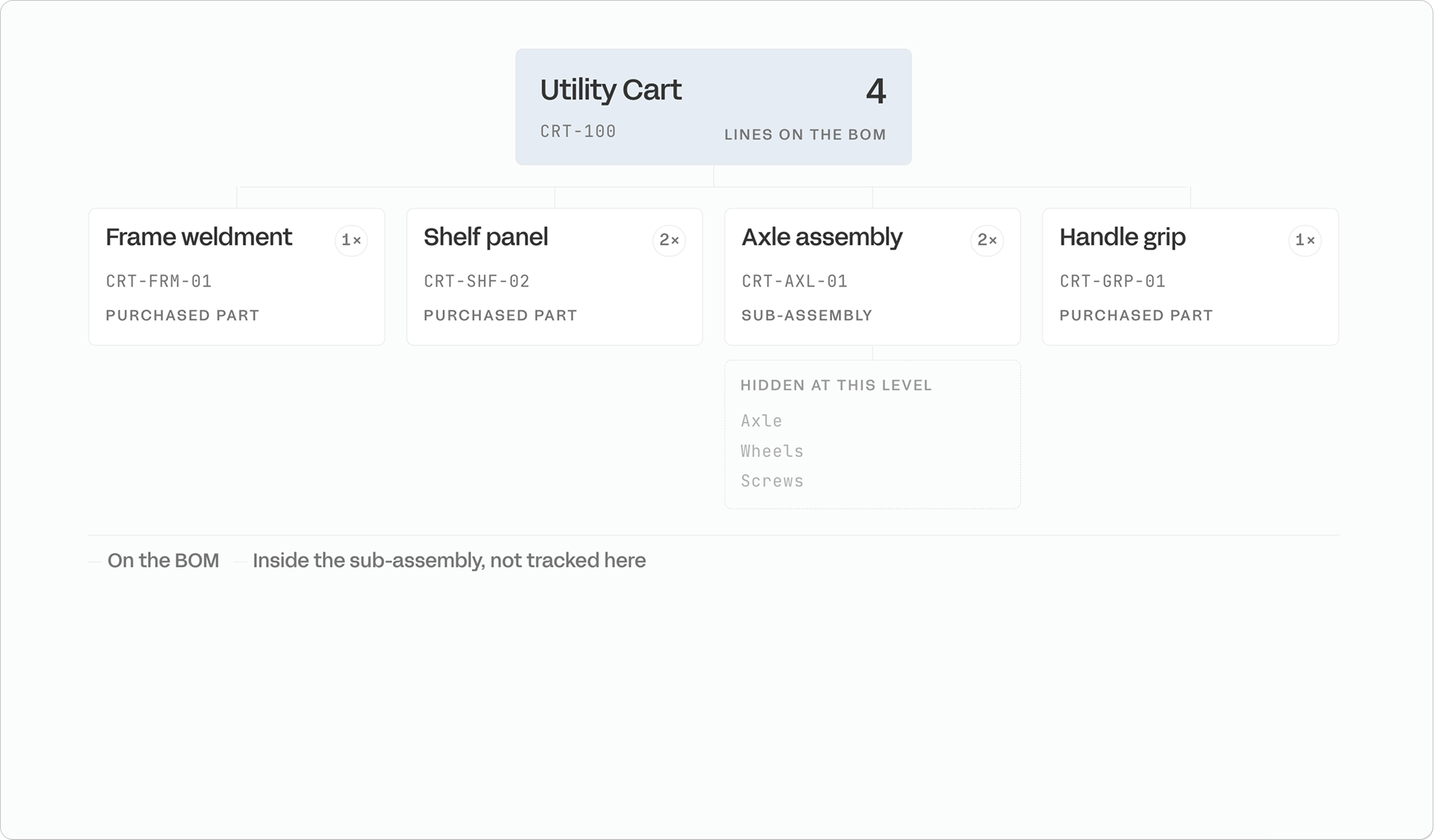
A single-level BOM lists only the immediate components required for the top-level assembly, without expanding sub-assemblies into their own parts.
If an axle assembly appears on the list, the axle, wheels, and screws within it remain hidden — the assembly shows up as a single line. This format works well for simple products with few sub-assemblies, such as a basic table or chair, where a flat list gives the shop floor everything it needs without extra layers to navigate.
The limitation becomes apparent as soon as a product involves nested assemblies, because a single-level BOM doesn't track what's inside each sub-assembly, nor can it reveal internal dependencies or support multi-stage manufacturing tracking.
2. Multi-Level BOMs
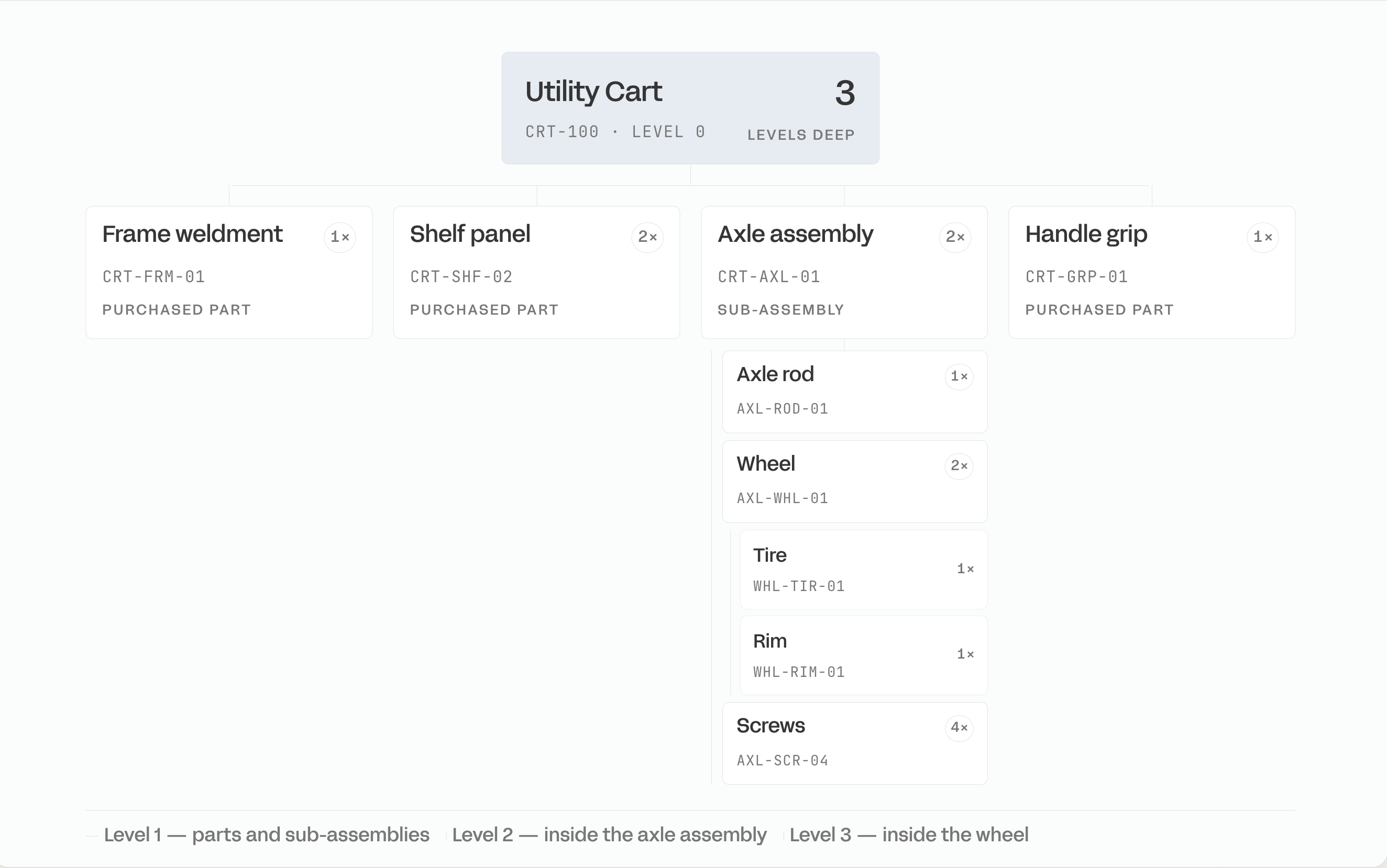
A multi-level BOM, also called an indented BOM, shows the full hierarchy of a product (assemblies, sub-assemblies, and the individual parts within each) as a nested tree rather than a flat list.
A skateboard illustrates this well:
- The top-level assembly includes a board
- A set of screws
- An axle assembly
Each level rolls up into the one above it, so the structure captures exactly how the product is actually built in stages.
This format suits more complex, multi-stage products (cars, computers, industrial equipment) where tracking what's nested inside each assembly matters for procurement, costing, and scheduling. Because every sub-assembly is broken out individually, a multi-level BOM also supports accurate rolled-up costs and makes it easier to reuse the same sub-assembly across multiple products or to build and ship partial assemblies.
3. Flattened BOMs
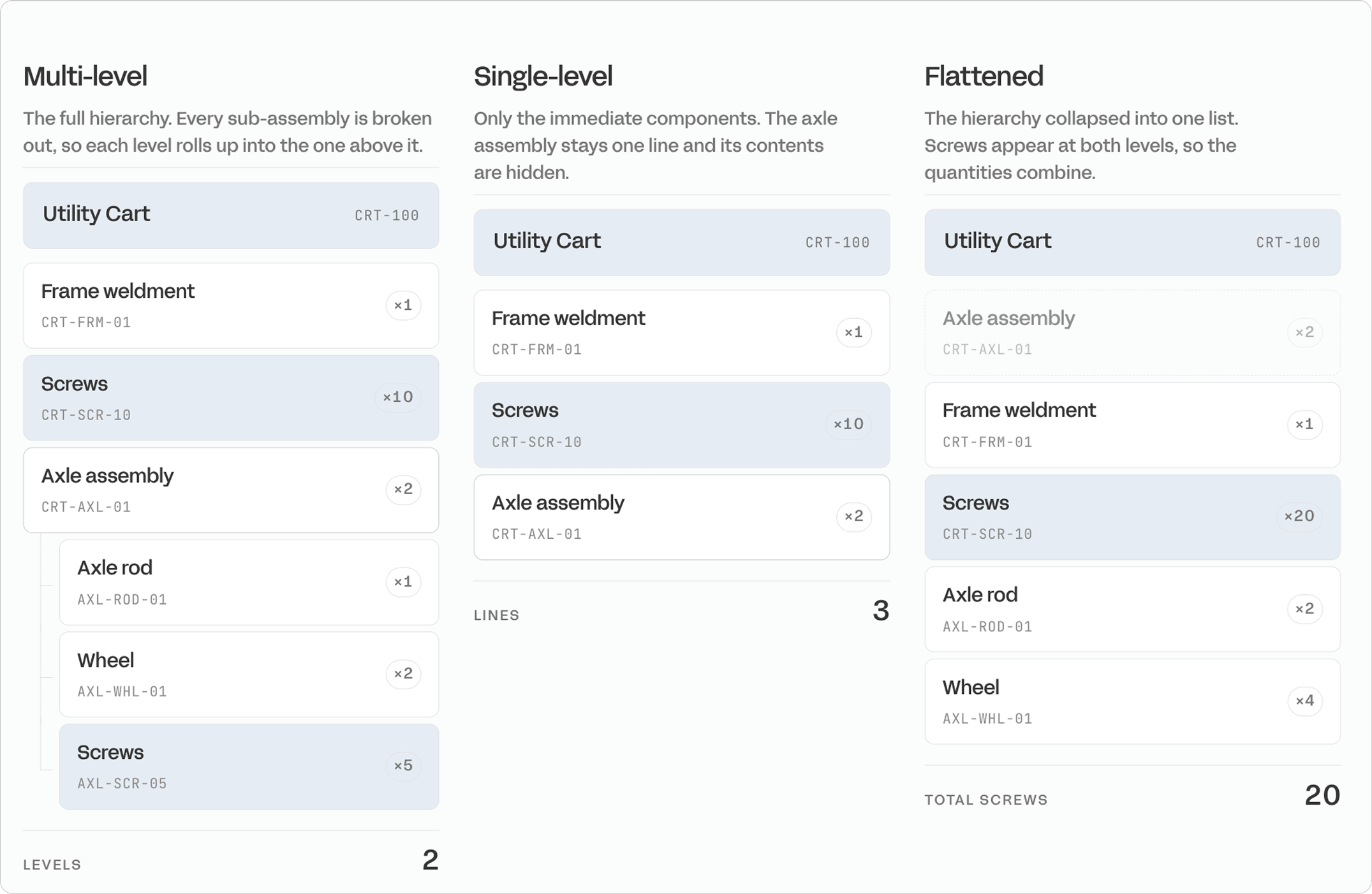
A flattened BOM takes a multi-level structure and collapses it into a single list, combining the quantities of any part that appears at multiple levels into one total.
Using the same skateboard example, screws might appear both in the top-level assembly and inside the axle assembly — a flattened view combines both instances and shows the true total screw count needed to build one finished unit. This structure only applies to products that already have a multi-level BOM, since there's nothing to flatten in a list that's already one level deep.
It's most useful when a team needs a quick, complete count of every part required for a build (for ordering, kitting, or floor-level picking) without having to navigate the full nested hierarchy to add it up manually.
7 Types of BOMs for Different Production Scenarios
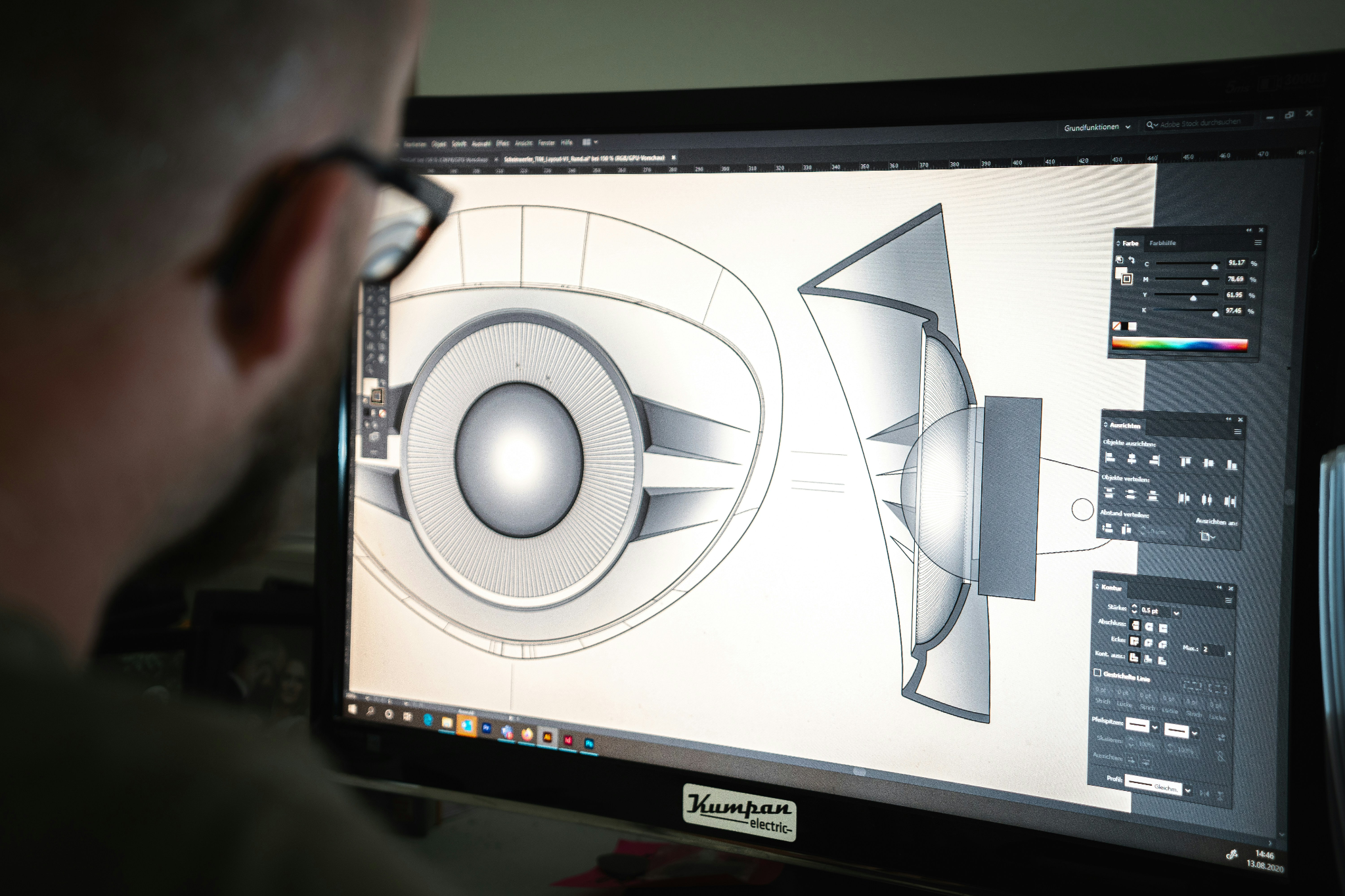
All BOMs represent the same product, but different types highlight specific details for particular purposes.
Some focus on engineering design, others on manufacturing, procurement, or service. Each type organizes the same components in a way that makes it easier for a team to plan, build, or maintain the product.
All BOMs represent the same product, but different types highlight specific details for particular purposes. Some focus on engineering design, others on manufacturing, procurement, or service. Each type organizes the same components in a way that makes it easier for a team to plan, build, or maintain the product.
1. Engineering BOM (EBOM)
The EBOM shows the product as designed by engineering. It focuses on technical specifications and design intent, not manufacturing details.
- Used by: Engineering and product design teams
- Created in: CAD or PLM systems
- Purpose: Design validation, prototyping, version control
EBOMs are best for product design, R&D, and managing design changes. EBOMs need to be converted into Manufacturing BOMs before production can start.
2. Manufacturing BOM (MBOM)
The MBOM is the version used for production. It lists all components, subassemblies, fasteners, packaging, and assembly instructions needed to build the product on the shop floor.
- Used by: Production and operations teams
- Integrated with: ERP and inventory systems
- Purpose: Procurement, production planning, shop floor execution
MBOMs are best for make-to-stock and make-to-order manufacturing. MBOMs show real manufacturing processes and constraints, not just the original design.
3. Sales BOM (SBOM)
The SBOM shows the product from a sales perspective. It focuses on how components are bundled or configured for customers.
- Used by: Sales and marketing teams
- Purpose: Product configuration, quotations, customer-specific kits
SBOMs are best for quoting, product bundles, and configurable options. SBOMs are common for products where customers choose options or variations.
4. Service BOM
A Service BOM lists the parts and components needed for maintenance, repairs, or after-sales support.
- Used by: Service and support teams
- Purpose: Spare parts inventory, maintenance workflows, field repairs
Service BOMs are best for after-sales service, maintenance, and field operations. These BOMs make sure service teams have the right parts on hand for warranty work or ongoing maintenance.
5. Costed BOM
A Costed BOM includes the price of each component, helping track product costs and profitability.
- Used by: Finance and procurement teams
- Purpose: Calculate cost of goods sold (COGS), support pricing decisions, guide cost-reduction efforts
A costed BOM is best for budgeting, margin analysis, and comparing suppliers.
6. Planning BOM
A Planning BOM helps with forecasting and overall production planning, not direct shop floor execution.
- Used for: Demand forecasting, capacity planning
- Includes: Phantom items or product families
A planning BOM is best for seasonal industries and high-mix/low-volume manufacturing. Planning BOMs help match supply with expected demand before actual orders come in.
7. Configurable BOM (CBOM)
A Configurable BOM supports products with multiple options or customizations.
- Capability: Adjusts component selection based on customer choices
- Common in: Build-to-order or mass customization
Configurable BOMs are best for custom products, configurable SKUs, and made-to-order production.
Each BOM type has a specific purpose. Picking the right type ensures all teams work from accurate, relevant data.
5 Benefits of BOM based inventory management
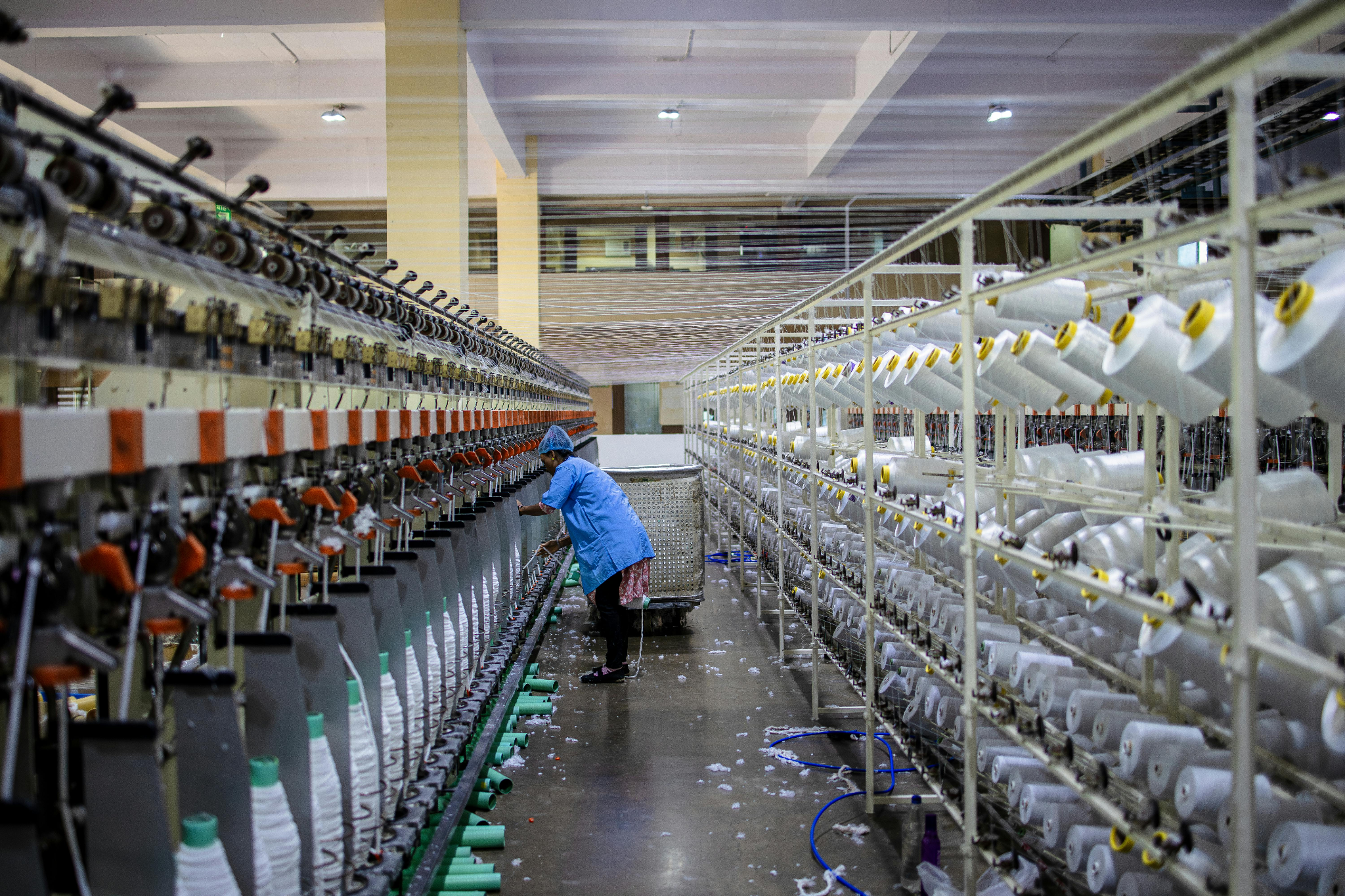
Using a Bill of Materials to manage inventory creates a direct link between production demand and material requirements. This approach improves control over inventory levels, costs, and production execution.
1. Accurate material planning
BOM-based inventory management turns production plans into precise material requirements. Each finished product is tied to its components and subassemblies, so planners know exactly what needs to be available, in what quantities, and when.
For example, if you need to build five bikes and each bike requires two wheels, the system calculates a total demand of 10 wheels. This prevents situations where builds are delayed because components were never planned correctly.
2. Reduced inventory costs
By purchasing materials based on BOM requirements, manufacturers avoid overbuying, excess stock, and unnecessary carrying costs. Inventory is held because it is actually needed.
BOM-level cost tracking automatically rolls material costs up through the product structure. This gives finance and operations teams a clear view of total product costs, margins, and pricing decisions.
3. Faster material decisions
When BOMs are connected to inventory and purchasing, material decisions happen automatically. Teams can quickly see if a production order is ready, identify shortages early, and trigger purchasing before delays occur.
This reduces last-minute problems, shortens lead times, and keeps production moving smoothly because material availability is known in advance.
4. Lower operational risk
Accurate BOMs reduce operational risk by making sure everyone works from the same, up-to-date data. Errors from incorrect part numbers, outdated quantities, or missing components are minimized.
BOM-driven systems also provide traceability, linking materials and components to finished products. This makes investigating quality issues, managing recalls, and meeting regulatory requirements easier and more reliable.
5. Scalable production
As product lines grow and assemblies become more complex, manual BOM management fails. BOM-based inventory management supports multi-level assemblies, shared components, and product variants without adding operational chaos.
This allows manufacturers to introduce new products, manage configurations, and increase production volume without multiplying spreadsheets, manual work, or inventory risk.
Common BOM inventory management challenges

Managing BOMs gets harder as products become more complex, customizable, or high-volume. Most problems come from how BOMs are created, updated, and integrated with other systems.
1. Errors from manual data entry
Spreadsheets and manual updates lead to mistakes: wrong part numbers, missing components, or incorrect quantities. Even small errors can disrupt production, skew inventory levels, and create costly rework.
Solution: Use BOM-specific software with validation rules, automated calculations, and centralized data storage to reduce errors and keep data consistent.
2. BOMs falling out of date
Design changes, supplier updates, and new product versions happen constantly. If BOMs aren’t updated in real time, teams may build with outdated materials or face unexpected delays.
Solution: Set up structured change management with automated notifications. When a revision occurs, all teams get alerts and work from the latest version.
3. Managing multiple products and variants
Shared components across different product lines can create duplication, confusion, and inventory imbalances without proper structure.
Solution: Use standardized templates and reusable subassemblies. This simplifies managing variations, applying updates, and keeping BOMs organized as your catalog grows.
4. Disconnected systems and data silos
BOMs in spreadsheets or standalone tools don’t sync with ERP, MRP, or inventory systems. This creates multiple versions of truth and increases ordering and accounting errors.
Solution: Integrate BOM management with ERP or inventory software. A centralized system ensures accurate inventory, cleaner financials, and better coordination across teams.
5. Complexity of multilevel BOMs
Products with subassemblies are hard to track manually. Managing hierarchies, shared components, and variants quickly becomes unmanageable in spreadsheets.
Solution: Use BOM software designed for multilevel hierarchies. These tools maintain parent-child relationships and automatically update all affected components.
6. Difficulty calculating costs and quantities
Multilevel BOMs require rolling up quantities, costs, and material requirements. Manual calculations are slow and prone to errors.
Solution: Automate quantity rollups and cost calculations. This gives accurate product costs, better forecasting, and clearer insights into profitability.
7. Poor communication across teams
When departments aren’t aligned on the same BOM data, it leads to wrong orders, mismatched inventory, and delayed production.
Solution: Create a single source of truth with shared access and real-time updates so all teams stay aligned.
7 Best Practices for BOM Management
%20(2).jpg)
Effective BOM management depends on keeping data consistent, accurate, and connected across the organization.
1. Establish a governed BOM foundation
Define BOM types, naming rules, version control, and approval workflows. This ensures everyone works from the same trusted source.
Did you know? A BOM manager owns the Bill of Materials as their primary responsibility, acting as the single point of accountability for revision control and cross-team coordination. Their job is to monitor parts for obsolescence before a supplier discontinues them and line up approved substitute components ahead of time so a design change doesn't stall a production run waiting on a part that no longer exists.
2. Use connected, real-time BOMs
Integrate BOMs with inventory, production planning, and purchasing systems. Changes should automatically update across all operations in real time.
3. Plan inventory and production from demand
Translate forecasts and orders into precise material requirements. This keeps inventory lean and purchasing aligned with actual production needs.
4. Collaborate with suppliers through BOM data
Share accurate BOM information with suppliers. Include lead times, substitution options, and availability to make planning proactive and reduce delays.
5. Maintain accurate cost visibility
Track costs at the BOM level to calculate product costs accurately. This helps identify opportunities to reduce material, labor, or overhead expenses.
6. Embed quality and traceability into BOMs
Link serial numbers or lot numbers to BOM components. This makes it easier to investigate quality issues, manage recalls, and meet regulatory requirements.
7. Review and improve BOMs continuously
Regularly audit and update BOMs to reflect changes in products, suppliers, or processes. Continuous review keeps data accurate and reliable.
Spreadsheets vs. ERP
Spreadsheets work fine for a handful of parts, but they weren't built to carry the weight of a full production process.
A typo in one cell doesn't just sit there — it cascades into wrong purchase quantities, missed inventory counts, and production runs built on outdated numbers, with no way to trace who changed what or when. An ERP system removes that fragility by connecting the BOM directly to purchasing, inventory, and the shop floor, so a single update flows everywhere it's needed instead of living in one person's copy of a file.
Choosing the right BOM software solution
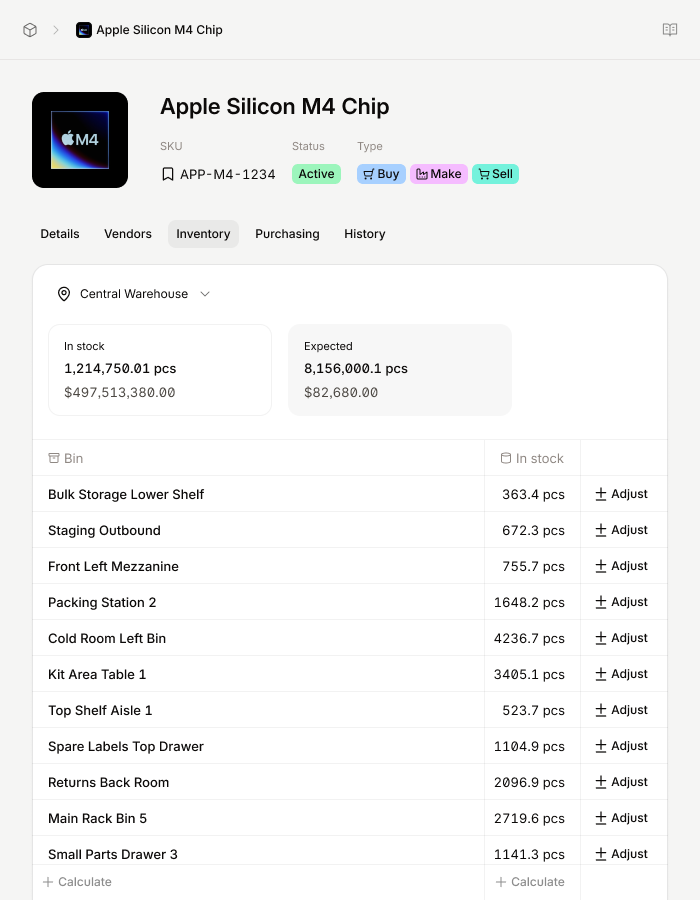
Not all BOM software works the same. Some tools focus on engineering documentation, while others focus on inventory control, production planning, and execution.
When picking BOM software for inventory management, look for these features:
Multi-level BOM support
The system should handle subassemblies and nested components automatically. Material demand should roll up from finished goods to raw materials without manual calculation.
Real-time inventory integration
BOMs should link to live inventory data so material requirements, reorder points, and stock levels stay accurate as production moves.
Clear distinction between purchased and manufactured items.
The system should show which components are sourced from suppliers and which are built in-house so demand flows correctly into purchasing or production.
Automatic quantity and demand rollups
Component quantities should update automatically across all BOM levels when production plans or orders change.
Version control and auditability
As products evolve, BOMs change. The system should track version history so teams always know which BOM is current and what changed.
Ease of use for operations teams
Planners, buyers, and inventory managers should be able to use the software without engineering expertise.
For manufacturers focused on inventory accuracy and production execution, BOM software must integrate tightly with purchasing, inventory, and shop floor workflows.
Getting started with Sutton's BOM inventory management
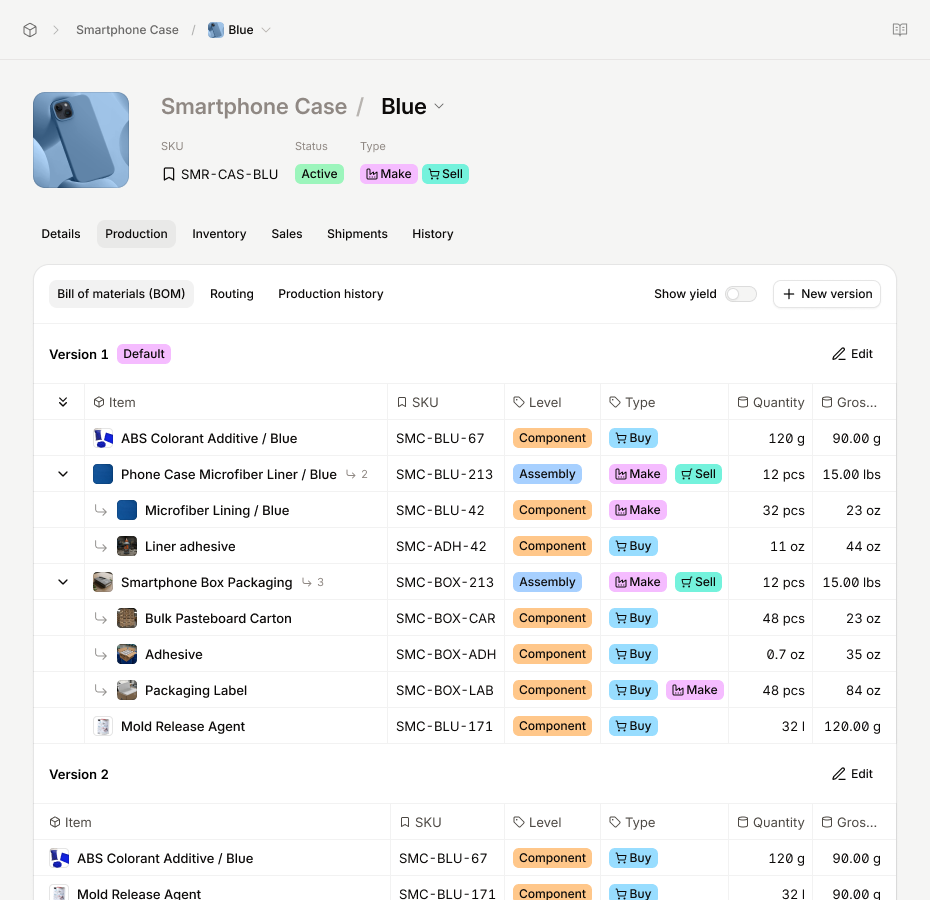
Sutton treats the Bill of Materials as a live tool rather than a static document. BOMs drive inventory accuracy, production planning, and purchasing decisions.
In Sutton, BOMs are part of each item record. You can create one or more BOM versions for a product, so teams can manage changes without disrupting production.
Here’s how Sutton makes BOM-based inventory management work:
- Operational BOM structure: BOMs show the materials and quantities needed to actually make a product, not just what the design specifies.
- Clear material sourcing: Components are marked as purchased or made in-house, helping purchasing and production stay aligned.
- Inventory-aware planning: BOMs connect to inventory so teams can see what is available and identify shortages early.
- Support for iteration: BOMs can be updated as products and processes change, reducing reliance on spreadsheets.
- Single source of truth: Linking BOMs with items, inventory, and production creates one centralized system everyone can trust.
By connecting BOM inventory management directly to production, Sutton helps manufacturers reduce manual tracking, avoid mistakes, and keep teams working from accurate, up-to-date information.
.jpg)


.jpg)

%20(1)%20(1)%20(1).jpg)