



What Is a Bill of Materials?
A bill of materials is a document that gives you and your team a structured list of all the resources needed to manufacture a finished product, such as:
- Raw materials
- Components
- Sub-assemblies
- Operational steps
- Manufacturing routing
Without implementing a manufacturing bill of materials into your production, you’re destined for your design, purchasing, and production to fall out of sync.
What does BOM stand for?
Sometimes you might see BOM being used when you search for any information on manufacturing. BOM is simply the short form of "bill of materials," and we will reference it throughout this article. There’s no difference between the two terms, and both list every component and raw material required to manufacture one unit of a finished product.
What is BOM Management and Why is it Important for Manufacturers?
As briefly touched upon in the definition, bill of materials management is important because it ensures that production output is consistent in quality, regardless of who worked on the product.
You can think of bill of materials management as a way to ensure everyone in the company works from the same source of truth, helping you all prevent any manufacturing errors and see that the knowledge to build a product is shareable and learnable. Once your bill of materials management has been defined, it’s just a matter of understanding what information should be saved and the structure your BOMs should follow (all of which will be covered in this article).
The Main Components of a BOM
There are different types of BOMs, which we will explore later, but usually the most that someone would want from their BOM is the following:
- Identification and Hierarchy: Parent–child relationships make assemblies and sub-assemblies explicit, so reuse and partial builds are easy to track.
- Material and Specification Data: Dimensions, grades, and standards ensure parts are interchangeable and quality is measurable.
- Procurement information. Approved suppliers, lead times, and negotiated pricing connect engineering decisions to purchasing reality.
- Routing References: Link components to the operation or work center that transforms or installs them.
- Revision Control and Approvals: Timestamps and sign-offs create an audit trail that helps with internal reviews or external regulators.
Depending on how you decide to build your BOMs and the tools you use, there are some other fields that can come with a manufacturing bill of materials, such as:
- Phase: As you know, products exist in different stages of a lifecycle, which can also be tracked in your BOMs to help you and your team understand if a product is in design, unreleased, in production, or end of life.
- Reference Designators: Alphanumeric codes (such as R1 for a resistor or C15 for a capacitor) that identify the exact physical location of a component on a printed circuit board, guiding assembly and debugging.
- BOM Notes: As things change, it’s always good to have a way to make annotations and share thoughts, or even document specific things that have to happen during manufacturing for a particular order, and some BOM software comes with a free-text field for special instructions, such as approved substitute parts, handling requirements, or supplier preferences.
For example, the bill of materials software Sutton was built to help manufacturers record the component items and quantities needed for one finished unit, and to achieve this, it supports the main components of a BOM (and more).
What Is an Example of a Manufacturing Bill of Materials?
Before we delve deeper into everything you need to know about getting BOMs up and running in your production, let’s look at an example together.
And since everyone loves chocolate (except for dentists), let’s imagine you're a chocolate bar manufacturer.
To manufacture a chocolate bar, the most basic BOM will consist of three components.
The Table Version
| Component | Quantity | Unit | Type |
|---|---|---|---|
| Chocolate base | 100 | g | Make |
| Chocolate wrapper | 1 | unit | Buy |
| Chocolate label | 1 | unit | Buy |
How Chocolate Will Look Like As A BOM Diagram
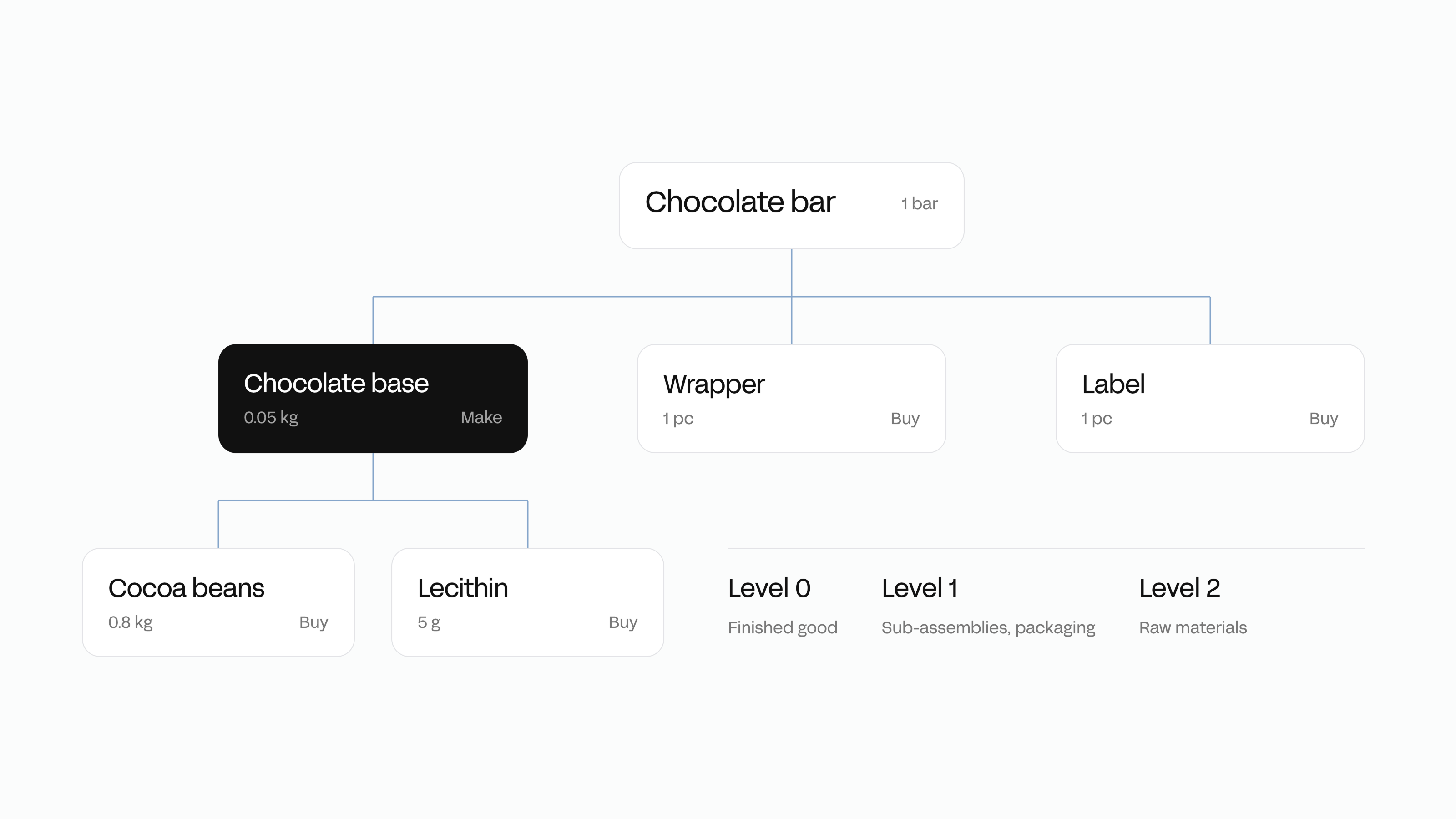
Regardless of which version you prefer to look at, each row or level tells you exactly what needs to go into making a chocolate bar, and even how it relates to other components and materials.
Depending on the tool you use, you may have different functionalities you can use.
For example, in the diagram above, we added "Make" and "Buy." We did this because in Sutton you can define which items are bought from a supplier and which ones are manufactured in-house or outsourced to a contract manufacturer.
But ultimately, the main goal of a manufacturing bill of materials, regardless of whether it’s built manually in spreadsheets or generated with software, should be to turn a list into instructions on how to produce something.
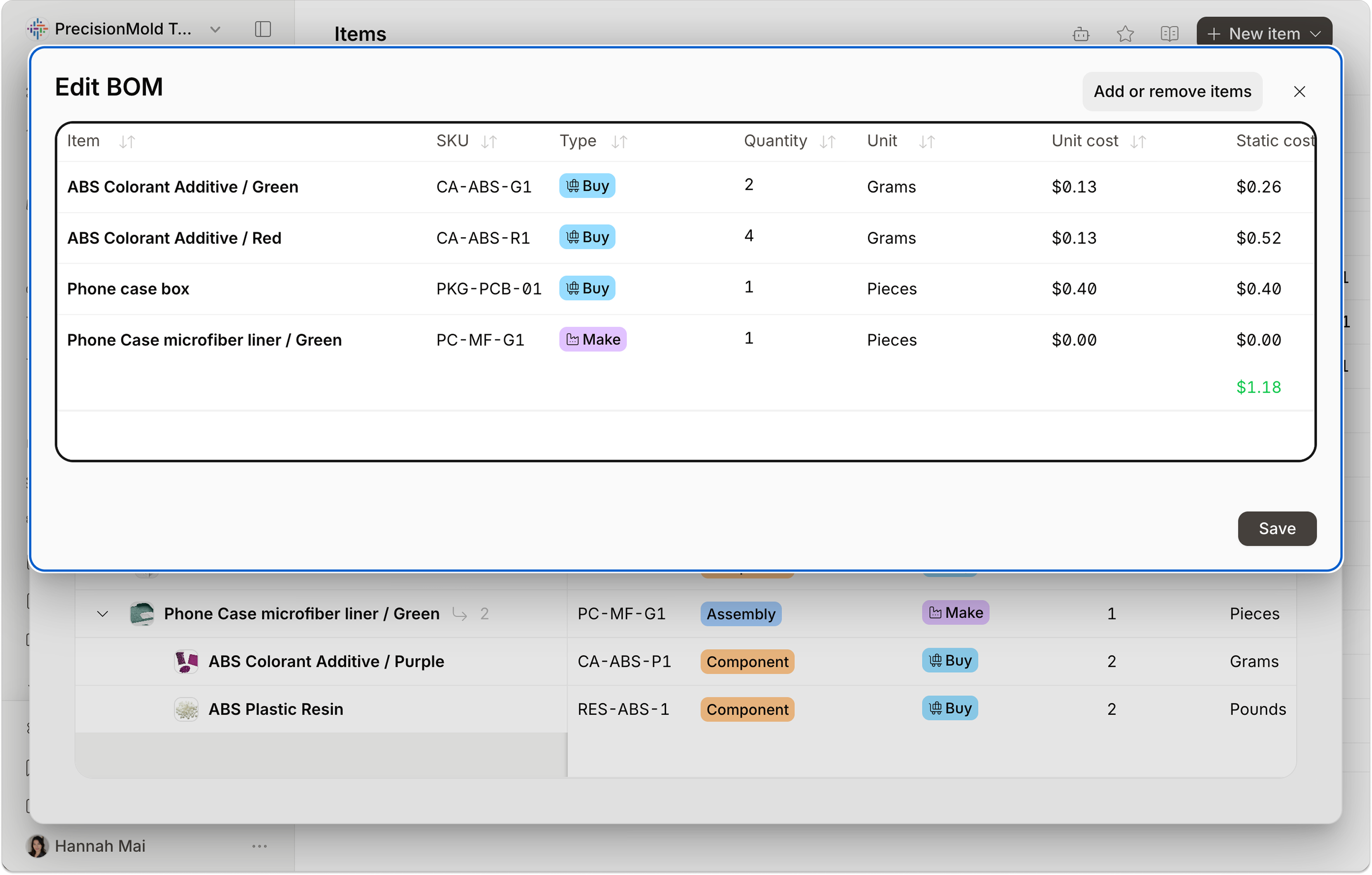
If you do decide to use Sutton, once you have the main components' details entered, you can move on to manufacturing routing, which will detail the sequence of operations the product moves through, like:
- Liquefy
- Temper
- Mold
- Cool
- Wrap
By doing this, your bill of materials essentially becomes a cooking guide, a document your operators can use to see the ingredients they need and the steps they have to follow to create a product.
How to Create a Manufacturing Bill of Materials in 8 Steps
Creating a BOM follows eight steps. The goal is one document that every department can trust and update responsibly. Here are the steps you can follow to create a bill of materials:
Step #1: Define the Finished Product
Identify the top-level item and give it a clear name, description, and internal ID.
Step #2: List every component
Record all parts, materials, and sub-assemblies required to build the product. Include consumables that affect cost or assembly too.
Step #3: Add Quantities and Units
Specify how much of each component is used, and keep units consistent across the BOM.
Step #4: Assign part numbers
Use a numbering system linked to your inventory or design files. Prevent duplication early, as later cleanups take longer.
Step #5: Include Supporting Details
Add specifications, drawings, suppliers, and cost references so each line has context.
Step #6: Structure the Hierarchy
Group related parts into assemblies and sub-assemblies. This keeps the document readable and supports reuse across products.
Step #7: Review and Approve
Engineering, production, and purchasing confirm accuracy before release. Once approved, that version becomes the official build record.
Step #8: Control Revisions
Every change, material, quantity, or supplier gets its own revision ID, date, and reason.
The Different Types of BOMs
Chances are, if you’re reading this article, you have seen what seems like a never-ending list of BOM types.
If you’re confused, that is fine! But, essentially, each BOM type can be used in one manufacturing business, but when and how you use those BOMs depends on how a product moves from design to production.
Hopefully, the following breakdown will make this easier to understand.
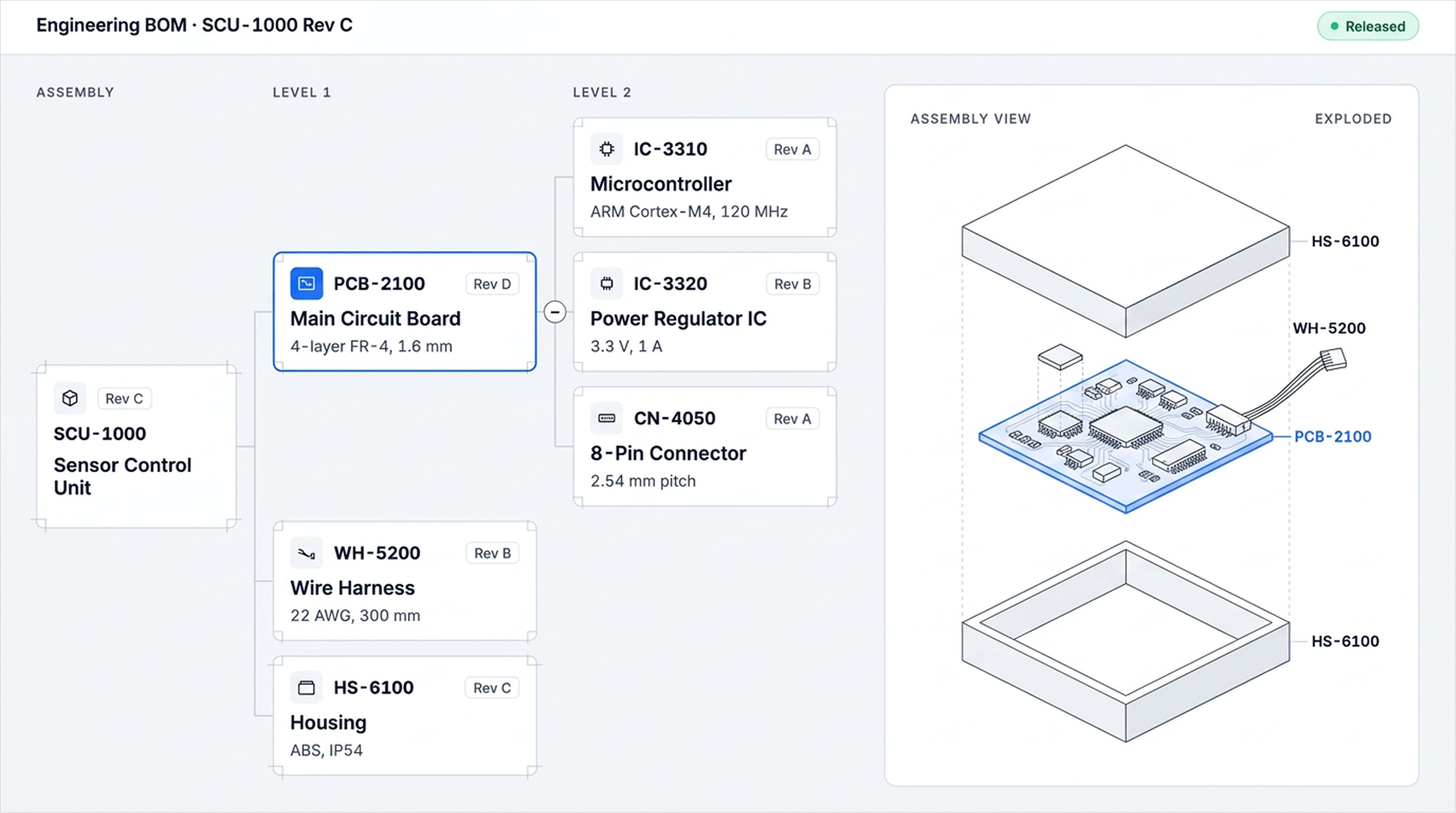
Engineering BOM (EBOM)
The EBOM captures the blueprints directly from CAD or PLM tools. It lists the items needed to satisfy form, fit, and function. It is often organized by the way engineers think about the product.
Use it when
Validating design, running FMEAs, or handing off to manufacturing.
Engineering bill of materials example
Manufacturing Bill of Materials (MBOM)
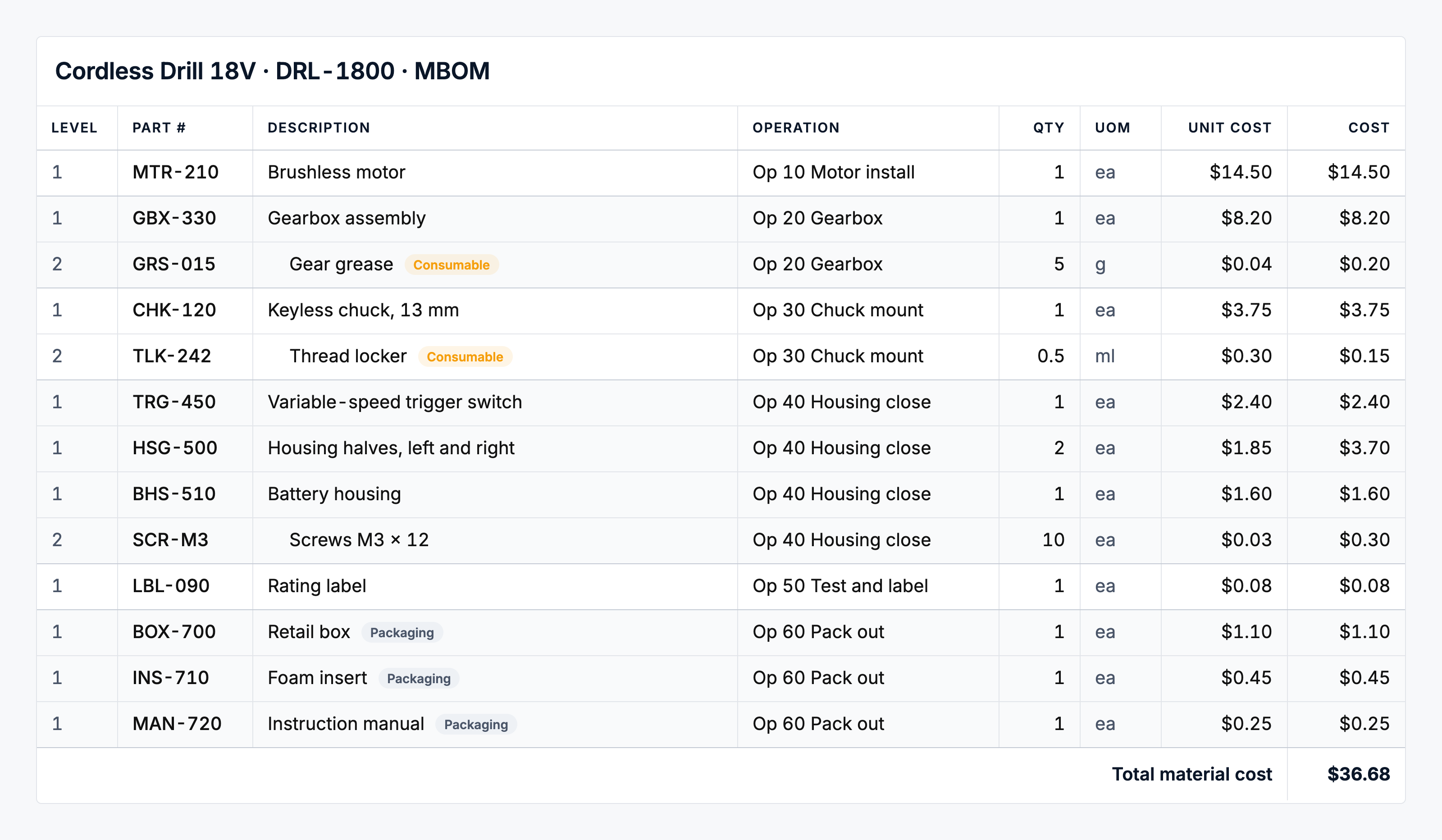
The MBOM shows how parts are made and assembled on the line, including consumables, packaging, and the sequence of operations.
Use it when
Planning production, issuing work orders, creating work instructions, or reconciling material usage.
Manufacturing bill of materials example
A cordless drill’s MBOM includes the motor, gearbox, chuck, trigger, battery housing, and fasteners, and each has a drawing number, material specification, and revision level.
Service BOM (SBOM)
The SBOM defines the serviceable or replaceable components needed to maintain an asset after sale.
Use it when
Planning preventive maintenance, stocking spares, or supporting field technicians.
Service bill of materials example
A filling line with replaceable seals, filters, and valves, including intervals and compatibility across model revisions.
Multi-Level BOM
A multi-level BOM, sometimes referred to as an indented BOM, displays the hierarchy of the product, such as assemblies, sub-assemblies, parts, and consumables, and how they all relate to each other.
Use it when
You need reuse across product lines, accurate rolled-up costs, or the ability to build partial assemblies.
Multi-level bill of materials example
A furniture table with a top, a frame assembly, and leg sub-assemblies. Each sub-assembly has its own parts, fasteners, and finishes.
Designer input: Either use a product screenshot or a simplified reimagining of Sutton multi-level BOMs.
Configurable or Modular BOM
A configurable BOM supports rule-based variation. The core stays stable as options and modules switch in and out according to what is needed.
Use it when
Great for customers to customize their order, such as size, finish, or different performance abilities. And great for you if you want to avoid maintaining dozens of nearly identical BOMs.
Bill of materials example
A manufacturer is building office chairs from one core frame while allowing customers to select different fabrics, arm styles, or wheel types. The shared structure keeps the data simple, and each order still produces the correct build list.
Single-Level vs. Multi-Level BOM
Before looking at BOM types by purpose, it helps to understand the two structural formats a BOM can take: single-level and multi-level.
A single-level BOM lists every component of a finished product directly, with no sub-assemblies involved — each item is a raw material or simple part, listed with the quantity needed for one unit.
A Lavender Chocolate Bar built this way would simply list its chocolate base, wrapper, and label as flat, independent line items.
A multi-level BOM applies once you unpack that "Make" row from the chocolate bar example above.
The chocolate base isn't a raw material since it's first produced from cocoa beans, sugar, and milk powder, then used as an input for the finished bar. The BOM reflects that hierarchy, nesting the sub-assembly's own components underneath it rather than listing everything at one flat level.
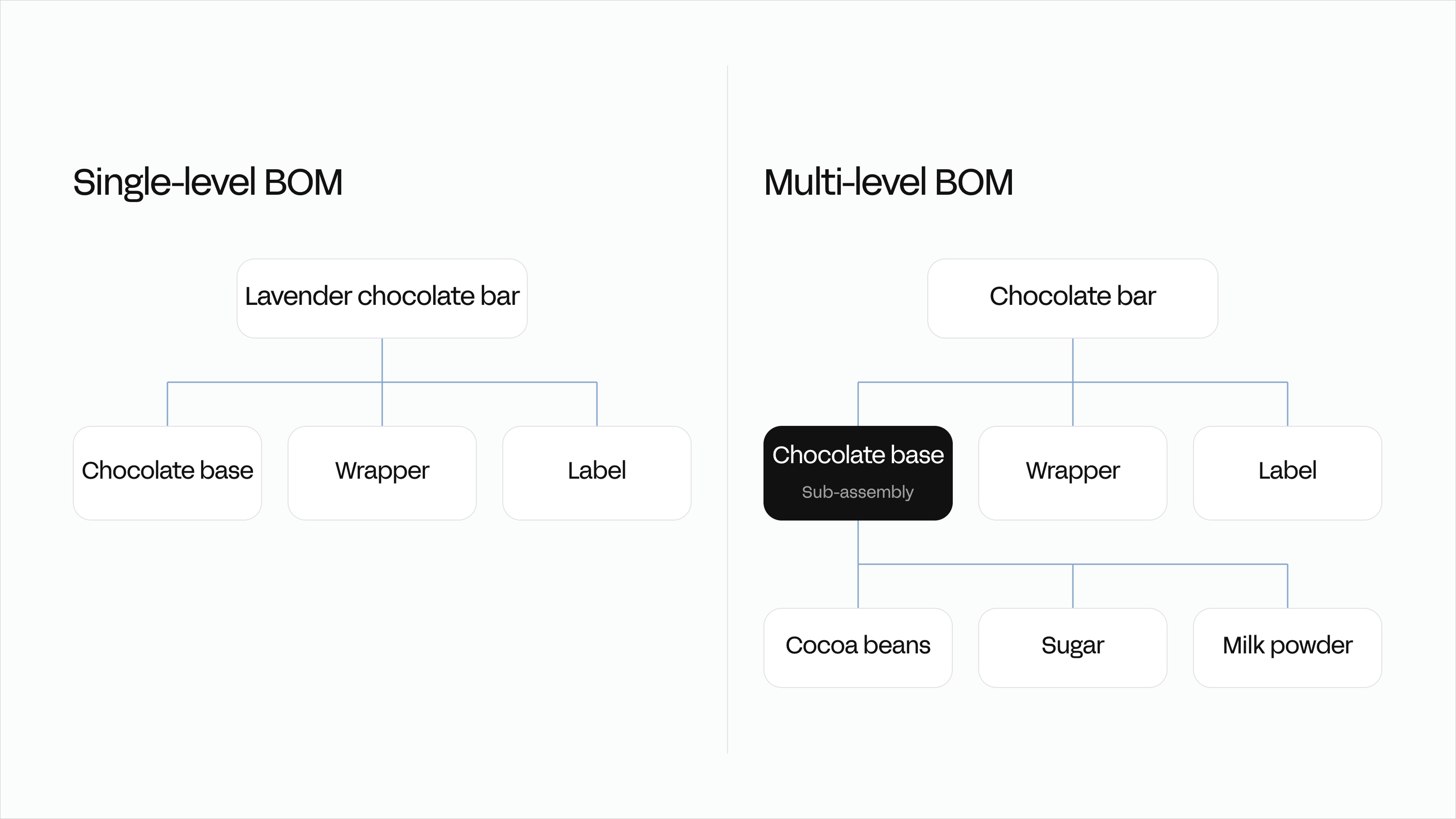
In Sutton, this hierarchy can be built out as nested BOMs, where a sub-assembly serves as a component inside a larger assembly.
For complex products, a single top-level manufacturing order can automatically generate manufacturing orders for every sub-assembly beneath it, so producing one finished unit doesn't require manually triggering production for each layer separately.
A single-level BOM goes straight from raw materials to finished product; a multi-level BOM goes from raw materials to sub-assemblies to finished product.
What's the difference between BOM and BOQ?
A Bill of Materials (BOM) lists the physical parts, components, and raw materials needed to manufacture or assemble a product.
A Bill of Quantities (BOQ) is a construction-specific document listing work items, quantities, labor, and costs, typically grouped by work section rather than product structure — used for tendering and bidding rather than production.
Best Bill of Materials Management Practices
Building a BOM is one thing, but good BOM management involves creating a set of routine checks to help you keep minor errors from turning into production delays.
Here’s how you can take your BOM management to the next level by actively maintaining your documents and addressing issues in the warehouse.
1. Standardize Part Names and Numbers
Use one clear naming rule across departments. Duplicates disappear, and searches return the right record the first time.
2. Keep One Verified Source of Data
Store the active BOM where everyone can see it. Eliminate the “final-rev-2” files sitting on local drives, as they always create rework.
3. Connect Costs and Suppliers to the BOM
When purchasing and engineering share the same data, margins stay visible and approved alternates are easy to apply.
4. Automate Revision Updates
Change an item once and let that change flow through production orders and purchasing lists automatically.
5. Review High-Use Products on a Schedule
Set a recurring audit (monthly or quarterly) for your main assemblies. Regular checks catch a problem earlier before it becomes a recall or a missed shipment.
6. Build Compliance into the Process
Involve quality and documentation teams at the start, not after release. Records created by the process hold up as records recreated after the fact rarely do.
Even with these practices in place, issues will surface, usually as communication gaps or version mismatches. The difference between reactive and reliable manufacturing is whether those issues are caught by the process or by the customer.
Common BOM Problems and How to Avoid Them
No process stays perfect once complexity enters the mix.
Even well-structured BOMs will still start to show signs of not being regularly updated when information changes faster than it can be documented. Recognizing the weak points early lets you tighten control before errors reach production.
- Spreadsheet Sprawl: Multiple versions circulate across drives and inboxes. A single broken formula can hide for months and surface as scrap, rework, or a missed shipment.
- Weak Cross-Team Communication: Design and production occasionally operate from different revisions. Without a change log and a single source, even careful teams produce different results.
- Missing Cost Visibility: When supplier changes aren’t saved, margins and forecasts become incorrect. Pricing and procurement drift out of sync.
- Rapid SKU Growth: As products multiply, manual methods collapse under revisions, alternates, and region-specific packaging.
Experienced teams address these by establishing a connected record of truth.
How Software Helps Manage BOMs
Many inventory and manufacturing systems use one form or another of bill of materials management.
Regardless of what you go with, these are the core capabilities that matter most:
- Centralized BOMs: Everyone sees the same approved BOM.
- Live Connections to Purchasing and Production: Engineering changes trigger material and cost updates automatically.
- Integrated Audit Trails: Approvals, reasons, timestamps, and user IDs live with the record.
- Full Visibility: Teams can see approved versions, active materials, and current costs from design through to production.
A tool capable of doing this is Sutton, and it does so by giving you access to BOMs and the ability to create a multi-level BOM to centralize the important information your team needs to produce a product to the same quality and standards every single time.
Scaling BOM Control as You Grow
As you grow, so does the list of everything else.
Growth means more SKUs, more regions as you expand into different markets, more packaging, more supplier constraints, and more of a bunch of other stuff that would make this article a 10-hour read.
Getting ahead of your BOM management now means that when you do start to grow, those growing pains won’t cause you nearly as much pain as if you don’t start ahead of everything.
You might not need to do this now, but later you should start considering investing in foundations that can help you scale:
- Data Standards and APIs: Decide how parts are named and how systems exchange data, then automate the exchange.
- Analytics on Change History: Use revision logs to forecast the cost and lead-time impact of potential changes.
- Modular Templates: Launch new variants by cloning tested modules, not rebuilding from scratch.
- Operator-Friendly Execution: Digital work orders and barcode scanning tie material usage and labor to the exact version used in a run.
Cloud-based systems lower the barrier for smaller teams to adopt the same control that larger manufacturers rely on.
For example, Sutton gives you the tools to automate and track your bill of materials, so you can move from spreadsheet bottlenecks to a fully connected shop floor without the ERP overhead.
A bill of materials is more than documentation.
It’s the operational framework that keeps manufacturing predictable. It defines every part, quantity, and cost that turns design into delivery, and it records the changes that keep products current.
When your BOMs sit in one shared system, every change is visible and verified. Problems surface early, and scaling depends on process, not constant correction.
.jpg)


.jpg)

%20(1)%20(1)%20(1).jpg)