



What Is Multi-Location Inventory Management?

Multi-location inventory management encompasses the methods and processes you use to track and manage your inventory across multiple locations.
Inventory management at multiple locations becomes necessary for businesses that operate at more than one facility, and need a system to be able to manage a supply chain that includes keeping inventory at:
- Warehouses
- Retail stores
- Distribution centers
The scope of multi-location inventory management can range from overseeing stock levels at several point-of-sale locations in one city to extending to other cities, regions, and even international locations. The width and breadth of the supply chain are irrelevant, as the goal will always be the same in a multi-location setting, and that will be the complete visibility of stock levels, regardless of where it’s stored. Finding a system that can give you a centralized view of inventory is going to help you make more informed fulfillment decisions to reduce shipping costs, improve delivery times, prevent stockouts, and even redistribute excess inventory from one location to another.
When Do You Need Multi-Location Inventory Management?
You need multi-location inventory management as soon as you start stocking inventory in more than one physical location.
This could look like:
- Two warehouses
- A warehouse and a retail store
- Your own facility plus a third-party fulfillment center
The moment stock splits across sites, tracking it as if it lived in one place will give you inaccurate stock counts, as inventory will inevitably move at different rates at each location.
It's worth planning for this capability before you actually need it, particularly in manufacturing, where raw materials, work-in-process inventory, and finished goods all need to be tracked separately at every site.
Choosing a system like Sutton with multi-location support built in from the start avoids a disruptive migration later, even if your current operation still runs out of a single facility.
For example, within Sutton, Locations represent the major storage areas, while bins are the specific spots inside each location where an your items actually are.
7 Multi-location Inventory Management Challenges

Managing inventory at one location is easy (well, easier).
You simply check your system and go into your warehouse and physically point at the inventory you have on hand, and if you have the stock, you can consider an order fulfilled. But, if you decide to break into a new market and store inventory closer to the end consumer, from your HQ you don’t have the luxury of going into storage and seeing if the inventory levels are correct or not, and have to develop a system that can now accommodate the complexity that comes with managing inventory at more than one location.
And if you don’t figure out a system, you will slowly erode your profitability as inefficiencies and fragmented data lead you to making bad decisions based on disconnected information.
So, here are 7 multi-location inventory management challenges you’ll need to overcome to get your inventory management up to speed.
1. Lack of Real-Time Visibility
Without a centralized view, stock data across sites can quickly fall out of sync.
And by the time you or a manager realizes a location is running low, it's going to already be too late to avoid a stockout. This same visibility gap can produce the opposite problem just as easily, as excess stock builds up at one location while another goes short, with no one able to see the full picture clearly enough to rebalance.
2. Inaccurate Inventory Records
If you’re already familiar with the pains of managing inventory at a single location, you know how easy it is for a mistake, delivery delay, or a misplaced item to cause havoc with your stock level data.
Now, multiply that by how many locations you’re storing inventory at, and the answer could be anarchy without a system capable of tracking and syncing inventory data from several locations. However, at a single location, you may only need to worry about making sure the inventory data is correct. With multiple inventory storage locations, the likelihood of theft, damage, and human error increases as your supply chain widens.
The only way to really combat these problems is to implement an inventory management system that keeps you vigilant, wherever you are.
3. Demand Forecasting Complexity
Customer behavior varies by region, seasonal patterns don't affect all sites equally, and sales data collected under different local practices can be inconsistent enough to undermine any forecasting model that tries to account for all of it.
The result is inventory that's perpetually misaligned, with overstock at one location and understock at another.
4. Rising Carrying and Operational Costs
Maintaining stock at multiple facilities means more overhead:
- Storage
- Insurance
- Staffing
- Handling costs
When inventory imbalances force unplanned transfers between locations, transportation expenses climb further.
Expedited shipments to cover shortages are consistently more expensive than planned replenishment, and manual reconciliation processes add labor costs on top of all of that.
5. Communication and Coordination Failures
At a single location, you could maybe even get away with just simply shouting across your warehouse — it wouldn’t be ideal, but the point is to illustrate that when your workforce is based in one location, it’s a lot easier to get everyone organized.
But when you open new storage locations, you need to make sure that your workforce at the new location is using the same systems and following the same reporting standards to ensure that information doesn’t get siloed. And again, depending on how wide your supply chain is, you’re going to have to deal with several other issues that will ultimately slow down decision-making, such as:
- Time zone differences
- Inconsistent procedures
- Lack of real-time data sharing
It’s going to be essential to figure out a system of communication so your teams at different locations can easily share stock updates to prevent stocking issues.
6. Returns and Reverse Logistics
Products moving back through the supply chain are harder to track than outbound inventory, and when they're not processed promptly, they drop out of the inventory record entirely.
That leaves stock levels inaccurate and makes planning more difficult across all locations that handle returns.
7. Scalability Limitations
Manual processes and disconnected systems that function adequately with one or two locations tend to break down as operations expand.
More sites mean more data, more potential for discrepancy, and a greater need for coordination, all of which expose the limits of systems that weren't built to scale.
And there you have it, the 7 major challenges you’ll need to figure out if you wish to implement multi-location inventory management into your business. But, to help you get started on formulating a plan, here are 8 best practices you can implement into your business to get the ball rolling.
8 Best Practices for Multi-Location Inventory Management

The first thing we highly recommend is to look into warehouse management software that can help you with inventory management at multiple locations.
However, when it comes to multi-location inventory management, the software you choose to implement is only going to be as good as your systems and processes. To efficiently manage inventory across multiple locations, you’re going to need to build a foundation that supports operating a more complex supply chain.
Starting with:
1. Implementing a Centralized Inventory Management System
Managing each location in isolation is one of the most common and costly mistakes a multi-site business can make.
A cloud-based inventory management system that connects all locations into a single platform gives every team access to the same data, eliminates discrepancies caused by siloed systems, and makes coordination across sites significantly easier. This is the foundation on which everything else builds.
Pro tip: Check out our article on the best warehouse management software to get started with choosing a system.
2. Establishing Real-Time Visibility Across All Sites
So, you’ve chosen a centralized system to help you with multi-location inventory management, but that system needs correct data flowing into it to get the most out of the tool.
Find a tool that comes with features and functionalities that enable the use of:
- Barcode scanners
- RFID tags
- Integrated tracking software
All of these tools will ensure that every stock movement is recorded instantly and accurately.
3. Setting Location-Specific Reorder Points and Safety Stock Levels
Demand varies by location, and a blanket reorder policy applied across all sites will almost always leave some locations overstocked and others running short.
Analyzing sales data at the individual location level allows you to set reorder thresholds and safety stock levels that reflect actual local demand, including seasonal variation and regional trends.
4. Forecasting Demand Per Location
Demand forecasting is essential for understanding just how much inventory you need on hand to fulfill orders.
However, the speed at which inventory moves from one location to another is going to be different, so you will need a tool that can help you calculate the demand at each location, as opposed to an aggregate calculation. To do this, you will need to understand sales data, seasonal patterns, and local market conditions to build location-specific forecasts.
5. Standardizing Processes Across All Locations
When different sites follow different procedures for receiving, storing, transferring, and counting stock, inconsistencies accumulate quickly.
Establishing uniform standard operating procedures (or SOPs) across all locations, and training your entire workforce to follow them, will help you:
- Reduce human error
- Make auditing more reliable
- Ensure that the data collected across sites is comparable
6. Centralizing Procurement
On the topic of centralizing data, we have mainly covered sales and inventory data.
However, another thing that should be on your mind when thinking of what information to centralize is your purchase order management. Why do you want to do this? Each location will have different requirements, depending on whether you use the spaces there to make goods, store inventory, or even sell from a specific location. As with everything else, you will likely need to handle procurement for each location differently to avoid duplicate orders and overstock.
Another benefit of centralizing this information is being able to negotiate better terms with suppliers, as you will be able to order more inventory from a supplier in one go and ship those items to the locations that need replenishment, and larger orders tend to come with better prices.
7. Optimizing Inter-Location Transfers
Rather than placing new supplier orders to cover a shortage at one site, redistributing excess stock from another location gets you replenished faster and at lower cost.
When transfers happen informally, the movement isn't recorded until someone remembers. Informal transfers might look like a phone call between managers or a spreadsheet updated after the fact. This leaves a gap where neither location's system reflects what's actually happening to the inventory.
That gap is where discrepancies start, because stock appears to still be at the original storage place but it's already in transit, or arrives at the destination without ever being logged as received.
A structured transfer process closes that gap by tracking inventory at every stage of the move:
- Before
- During
- After
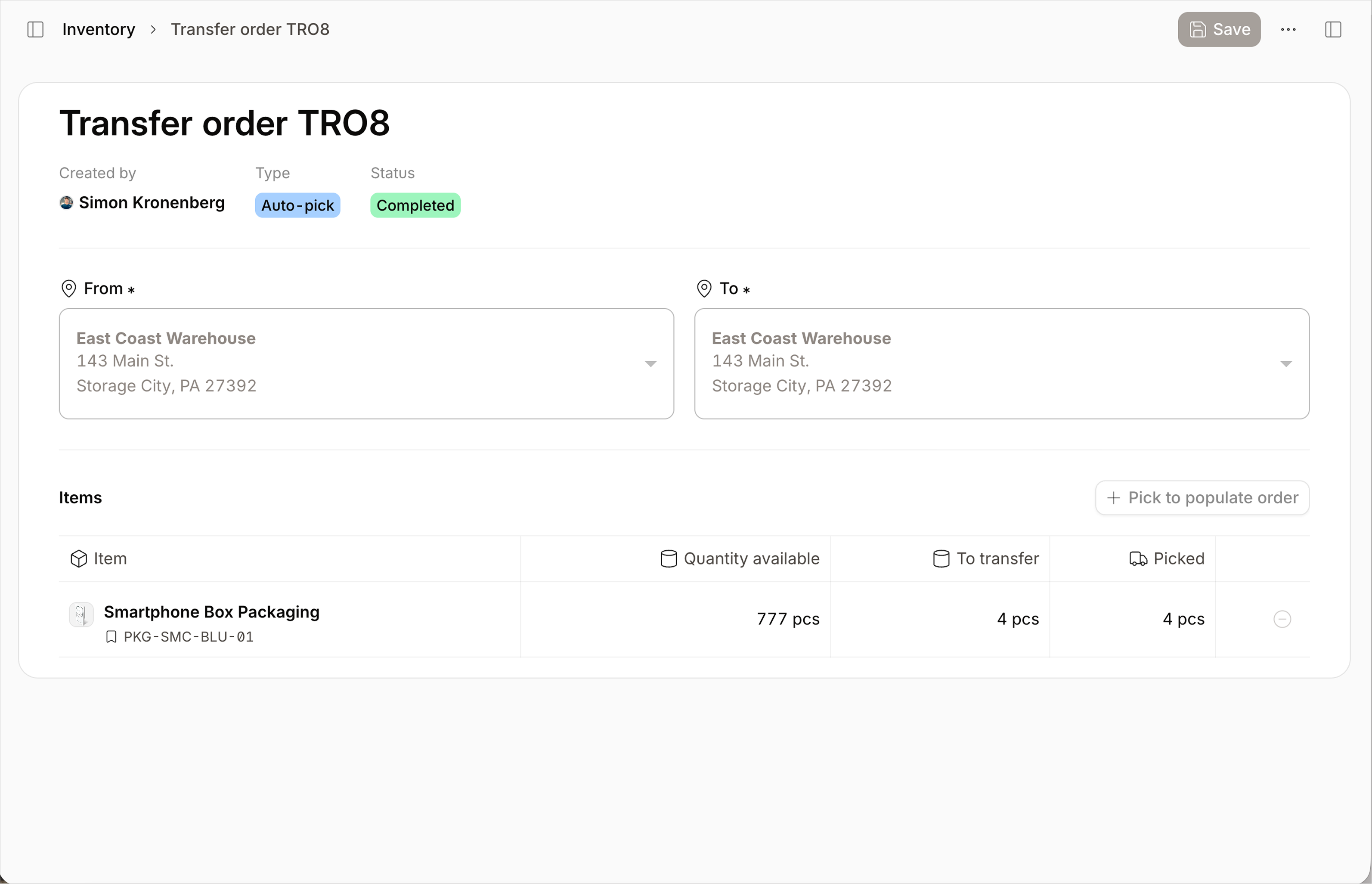
To give you an example of a typical transfer process, let’s look at how it works within Sutton.
To start a transfer, create a transfer order specifying the origin and destination locations, then choose how it should be fulfilled:
- Auto-receive — completes the transfer immediately, marking the inventory as shipped and received in one step
- Auto-pick — handles picking automatically while you complete shipping and receiving manually
- Manual — gives you full control over picking, packing, shipping, and receiving at every stage
From there, add the items being transferred, either by scanning barcodes or searching your catalog, then set the quantity and destination bin.
Saving turns the transfer into an order that shows up in your Transfer Orders list. From here, you or someone else can find it, ship items against it, and have them delivered to the destination.
This structure means Sutton shows exactly where the inventory is at any point in the process, rather than leaving that status to memory or informal communication between locations:
- On the shelf
- In transit
- Received
8. Conducting Regular Inventory Audits
And finally, even if you have chosen a system and have been able to automate all of your multi-location inventory management processes, you will still need to perform regular inventory cycle counting.
This is an essential practice in inventory management. Even though everything is now automated, you still need to make sure that the data that is fed into the system is accurate. You can do this by implementing regular audits that are going to help you catch:
- Shrinkage
- Data entry errors
- Discrepancies
And there you have it, all the challenges and best practices you should keep an eye out for when implementing multi-location inventory management. And if you’re someone who is on the first step of this journey, which is picking out a system to manage your business with, we recommend checking out Sutton.
Core Features to Look for in Multi-Location Inventory Software
Choosing inventory management software for multiple locations comes down to whether the system gives you one accurate picture of stock across every site, or whether you're stitching that picture together yourself.
Use this checklist when evaluating options:
- Centralized dashboard — All warehouses, stores, and fulfillment centers should feed into a single view, not separate logins or spreadsheets per site.
- Real-time stock visibility — Quantities, movements, and in-transit inventory should update instantly across the network, including per-location and all-locations views.
- Flexible transfer workflows — The system should support moving stock between sites with varying levels of automation, from fully automated to fully manual, plus a fast option for scanning and transferring items on the spot.
- Location-specific reorder points and safety stock — Each site needs its own thresholds, not one blanket policy applied everywhere.
- Per-location demand forecasting — Forecasts should be built from each site's own sales history and seasonality, not an aggregate number split evenly.
- Barcode and mobile scanning — Picking, packing, receiving, and cycle counts should be scan-based to keep records accurate as volume grows.
- Bin-level tracking — Beyond tracking which location holds an item, the system should be able to require a specific storage position during receiving, production, picking, and adjustments when that level of precision matters.
- Role-based permissions — Access should be restrictable by user role and by location, so staff only see and edit what's relevant to their site.
- Accounting and ERP integration — Stock updates and inventory valuation should sync automatically with your existing financial or enterprise systems, rather than requiring manual reconciliation.
A multi-location system that checks all of these boxes gives you the centralized visibility that multi-location operations depend on, without forcing your team to patch the gaps manually.
Managing Multi-Location Inventory with Sutton
.jpeg)
Sutton is a cloud-based multi-location inventory management software that can help you manage stock levels across your entire supply chain, from anywhere with an internet connection.
Using Sutton, you can create and manage multiple storage points, at bin locations within your warehouse, or across multiple sites tracked in one place. Items can be tracked by serial number, and you can enable batch and lot tracking for full end-to-end traceability. And, if one site's inventory is being consumed quicker than you initially anticipated, you can easily perform a stock transfer and replenish stock from one location to another.
Each serialized item or lot is tracked under one label, and that label is tied to a single location. If you transfer the item, the label's location updates to the new site — it doesn't get duplicated or left showing "in stock" in two places at once. That's what prevents the same serial from being double-counted or sold from a location it's no longer at. It also stops that serial from being allocated to more than one order — the reservation screen shows each label's current location and quantity, letting you select exactly which labels to commit.
Labels aren't locked into all-or-nothing movement, though. You can split a serialized label to pick or transfer part of its quantity while the rest stays at the original location, and full traceability is maintained for both portions. This same flexibility extends to order fulfillment — if a location doesn't have the full quantity requested, the order can be marked as partially available, allowing you to fulfill what's on hand at one site while the remainder ships from elsewhere.
Sutton makes multi-location inventory management effortless, and best of all, you can try Sutton for free, so you can test out all the multi-location features.
Pro tip: Real-time inventory visibility pays off fast — one Sutton customer cut lead times from 16 weeks to just 4 days after replacing manual tracking with live inventory data.

%20(2).jpg)