



What Is AI Order Management?
AI order management refers to the process of using artificial intelligence tools to manage the entire order management lifecycle by automating and optimizing how you communicate with and evaluate your suppliers, using:
- Large Language Models
- Predictive Analytics Engines
- Anomaly Detection Algorithms
Before AI emerged, teams managed this workflow manually with spreadsheets or by implementing order management systems (OMS). The latter is the best approach because spreadsheets are only manageable at a microscale, and even updating OMS systems still takes significant team resources to keep up to date. This is because OMS tools rely on pre-set rules, and once a rule is broken, the system will flag this for a human operator to intervene, figure out a solution, and implement a fix.
However, AI order management systems can take those same rules and monitor your orders in real time to identify bottlenecks and implement fixes if you decide to use a tool that uses AI agents or Agentic AI.
And more and more businesses are starting to catch on to just how important it is to have these AI systems implemented into their workflows. For example, according to a Gartner report, 75% of large enterprises say they want AI-driven analytics in their supply chain within the next year.
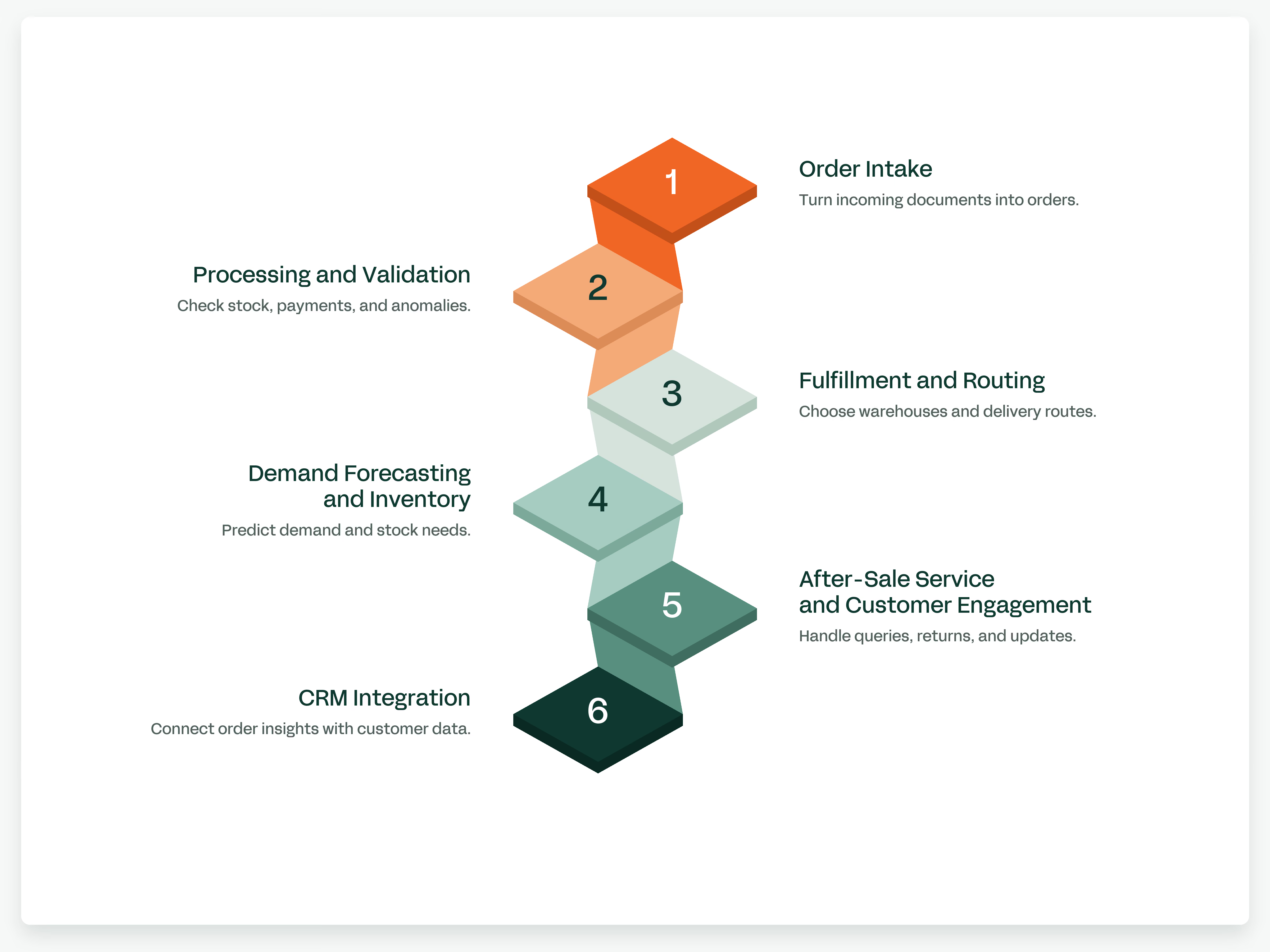
6 Ways AI Is Transforming the Order Lifecycle
AI in order management can be used simply to organize and prioritize orders to fulfill so your team knows exactly what to focus on throughout the day.
But AI can essentially be implemented into almost any aspect of your day-to-day to remove the repetitive tasks or help get an order out the door and delivered to the customer. How you implement AI into your workflows is up to you, for the most part. Which doesn’t make the idea of implementing AI any easier, so to get you started, here are just some of the ways you can use it in your order management process.
1. Order Intake
Depending on the AI you decide to implement into your business, they use different processes for reading data and organizing it into an order.
For example, some AI order management systems use Optical Character Recognition (OCR) and Natural Language Processing (NLP), which can read and understand the ad hoc sales order you might get from:
- Emails
- PDFs
- Spreadsheets
- Fax
- Website forms
- Direct messages from customers
What AI will do is take all the information from the source document, structure it, and create an order for an operator to input into whatever OMS you’re using or even automatically generate it within the tool if the AI has permission (best of all, if there’s information missing from the document, an AI order management system can auto-fill the empty fields in the order based on a customer's past orders or use predictive algorithms.
2. Processing and Validation
When implementing AI for order management, you can set it up early in the order process to validate incoming orders, ensuring there’s enough inventory to fulfill them and that payments have successfully gone through.
Machine learning analyzes each order to detect and flag anything that looks out of the ordinary, reducing manual errors like approving an order when it shouldn’t be fulfillable and helping prevent fraud. It does this by looking into:
- Unusual order quantities
- Suspicious payment patterns
- Duplicate orders
Similarly to what we covered under the order intake point, another thing that AI can do for you and your business is clean up customer data and their order records to make sure that the latest information in the software is correct based on the customer's most recent order.
And since you have AI potentially managing both intake and validation, you will achieve quicker order processing and share order status updates with customers, without ever having the need for an operator to step in and change anything.
3. Fulfillment and Routing
So, orders have been received and approved, and now the next step is to get those orders fulfilled as soon as possible.
Unfortunately, AI won’t be able to help you here (unless you’re using robotics, but we’ll assume you’re not for the sake of making a point). But what an automated work order management AI system can do for you is help you with your routing and pick, pack, and ship lists.
For example, if you’re storing inventory at several different warehouses, the AI can look into each warehouse to see:
- The current capacity
- How fast stock moves
- How much it would cost to ship from each warehouse
Based on that information, the AI can assign the best shipping route for an order and assign tasks to the relevant warehouses and operators for the most affordable and efficient delivery.
4. Demand Forecasting and Inventory
Historically, many order management tools have been more than generous when describing themselves as a tool that comes with demand forecasting and inventory management.
This is because these tools have only had access to past sales orders, which is only one component of the demand forecasting process. AI for order management uses predictive analytics to create forecasts based on historical trends and seasonal fluctuations, and it can also track external data points, as we mentioned earlier, to create forecasts based on global trends and current supply chain health. By considering all these data points, it can track inventory levels across multiple locations and predict how much inventory each location will need to keep fulfilling orders.
5. After-Sale Service and Customer Engagement
You’ve more than likely come across this yourself when heading to a website to purchase something, and that is using AI chatbots or virtual assistants to help with your order management process.
This can be as simple as having a chatbot answer customer queries to encourage them to use self-service, or something more complex that can help you manage:
- Returns
- Refunds
- Shipping status updates
- General order inquiries
This frees up your team from having to deal with customers' questions or complaints, while also helping you resolve issues even faster.
AI order management isn’t just there to help you serve potentially dissatisfied customers as quickly as possible and keep them happy. AI can also be integrated into the sales process to upsell or cross-sell by analyzing past purchase behavior and preferences. Personalized interactions like this lead to higher conversion rates and improved customer loyalty.
6. CRM Integration
Continuing on from the previous point of having better interactions with customers, an AI order management system can integrate with your Customer Relationship Management (CRM) platform to log how customers interact with the business.
Once it has recorded data from some orders, the AI tool can generate insights for your sales team so they can better understand how to improve the tactics and methods they use to nurture leads. And since the AI order management system is already recording your sales data, you can ask it to generate detailed reports so you and your team can analyze:
- Sales performance
- Order trends
- Customer behavior
How to Handle Multi-Channel Orders with AI in 4 Steps
You can handle multi-channel orders with AI by connecting your sales channels to a centralized hub where AI automates:
- Inventory syncing
- Order intake
- Customer support
1. Centralize Order Intake
Use AI tools that pull orders from your website, marketplaces such as Amazon or bol.com, and social platforms through official APIs and webhooks.
When orders arrive as emails or other unstructured data, the AI reads them, performs fuzzy matching against your product catalog, and formats the data. The system then selects the best warehouse and carrier and applies the pricing rules for each channel to every order.
2. Synchronize Inventory in Real Time
Connect your inventory pools with real-time synchronization instead of delayed batch updates.
When an order arrives from any channel, the AI reserves the stock immediately in your ERP or warehouse system. This blocks cross-channel overselling.
3. Unify Customer Support
Use a multichannel platform that gives your AI agent live order context, regardless of whether a customer bought through Shopify, Magento, or WooCommerce.
For example, you can program the AI to handle repetitive "Where Is My Order?" (WISMO) requests by pulling real-time tracking and delivery data from your logistics software. You can also set up policy layers that route the more complex issues to human agents, including:
- Refunds
- Cancellations
- Low-confidence responses
This frees up your team to focus on the conversations that actually need a person, while customers with simple questions get answers right away.
4. Streamline Returns Across Channels
Finally, register returns from any channel and link each one back to the original cross-channel transaction, such as a customer buying online and returning in-store.
From there, the AI can:
- Issue the credit note automatically
- Book the item back into active stock
- Send the item to quality assurance
So returns stop being a manual cleanup job and start feeding accurate numbers back into your inventory.
Why AI Order Management Needs Connected Inventory and Production Data
AI order management needs connected inventory and production data to make accurate, real-time fulfillment decisions and prevent stockouts or delays. Without connected data, the AI works with assumptions about stock and production status. With connected data, it acts on the figures in your system.
Live inventory levels let the AI instantly tell customers what is available without overpromising.
Inventory data gives it stock levels, lot information, and warehouse locations to check before it recommends or creates an order. Production data, meaning Manufacturing Orders and Bills of Materials, shows what must be produced and which raw materials are required. Connecting factory data also tells the AI when upcoming batches will be finished, so it can schedule orders before items sit on a shelf.
If one warehouse runs low, the system uses production schedules and inventory data from other locations to pick the best fulfillment path.
Siloed data creates blind spots, but linking production and stock stops the AI from accepting orders the factory can't support in time. And with both data sets connected, the AI can suggest or create purchase orders and sales orders based on demand and available inventory.
The Benefit of Using AI Order Management
An AI assistant connected through MCP Connectors can recommend or create orders based on current stock and production needs.
It reduces manual data entry and human error, and it keeps data consistent across systems and workflows. Teams get to focus on priorities because routine tasks are handled for them. Live inventory and production visibility replace assumptions with current figures, which helps teams avoid stockouts and production delays.
How Sutton Connects AI to Your Operational Data
Sutton connects AI to your operational data through MCP Connectors.
An AI assistant can then read and act on live information from your Sutton account. It can query:
- Sales orders
- Purchase orders
- Inventory levels
- Lot information
- Warehouse locations
- Items
- Bills of materials
Sutton makes inventory and production data available because it records them in the system.
Inventory is created when goods are received from suppliers, produced from Manufacturing Orders, or added manually. Manufacturing Orders pull raw materials from the Bill of Materials (BOM) and create finished inventory when completed. Sutton stores the data, and MCP Connectors allow an AI assistant to read that data and act on it. The AI therefore evaluates current stock levels and production requirements before it recommends or creates orders.
And there you have it, everything you need to know about AI order management and how to get it up and running in your business. If you’re looking for a new tool that you can integrate AI with as you upgrade your order management processes, we recommend checking out Sutton, an order and inventory management software that can help you centralize your entire business in one place.
If you would like to see it in action, book a call here and get a personalized demonstration of Sutton in action.
.jpg)