



What Is Inventory Software for Manufacturing?
Inventory software for manufacturing is specifically built to give businesses that manufacture goods on-site or with a contractor the tools to track and manage raw materials, work-in-progress (WIP), and finished goods throughout the production cycle.
The difference between generic inventory management tools and ones built for manufacturers is that your stock levels are tied directly to production. This means when you create a manufacturing order, materials and subassemblies are automatically committed to production, and inventory levels update to reflect these movements, and the associated manufacturing costs are tracked. Inventory and manufacturing software will typically include features such as:
- Bill of materials (BOM) management
- Production scheduling
- Batch and serial number tracking
- Demand forecasting
Many manufacturers turn to this type of software when they have reached a point where they need to replace their disconnected spreadsheets with a single system that keeps purchasing, production, and inventory aligned in real time.
The Best Inventory Software
If you’re looking to implement the best inventory software into your business, here are the ones we recommend you add to your list to check out while you browse the market.
1. Sutton
Sutton is the best inventory software for manufacturers and distributors.
Rating: 4.9/5
Pricing: Starts at $320/month
Compared to other software featured in this list, Sutton is relatively young and has quickly made its mark in the inventory management space.
Sutton is a cloud-based ERP solution you can use to optimize and manage your inventory, purchasing, production, and fulfillment operations — perfect for businesses that are stuck in the hell of Excel spreadsheets or need to escape the purgatory of legacy ERP systems.
It's an upgrade for anyone looking to unify all their important business data into a single, real-time system that's fast to implement and easy for both operators and managers to use every day.
Why Does Sutton Win Best Inventory Software Overall?
Sutton gives you the technical depth and functionality of an older, more established ERP system, but with the simplicity that modern teams have come to expect when it comes to using software.
Instead of spending tens of thousands of dollars and hundreds of hours implementing a bespoke on-premise ERP, Sutton gives you real-time inventory visibility, barcode-driven accuracy, purchasing, production, and traceability at a fraction of the cost, in both time and money.
If you head over to review sites, you will see that users love using Sutton for its:
- Rapid implementation (days, not months)
- Extremely intuitive UI
- Best-in-class customer support
- Real-time, barcode-driven inventory accuracy
Sutton's Core Features
Sutton gives you the ability to manage your inventory from end-to-end, so you can easily run your:
- Inventory Management — You can easily see what's in stock at any point in time and at any of your warehouses and bin locations. When items are scanned in and out with barcodes or QR codes, inventory levels update automatically. You can also track batches, lots, serial numbers, and nested inventory items, helping you follow every product step-by-step from supplier to final shipment.
- Purchasing and Receiving — Creating purchase orders is simple and tied to your vendors and SKUs. You can receive orders in full or partially, and if something arrives unexpectedly, you can retroactively create a purchase order for that shipment. Generate labels for pallets, boxes, or containers and track item movements instantly with a barcode scanner.
- Planning and Forecasting — Set reorder points to establish safety stock levels so you always have the inventory you need to fulfill orders on time, with one clear view across purchasing, production, and stock on hand.
- Sales and Fulfillment — Sutton guides your team through picking and packing step by step and automatically generates packing slips, bills of lading, and shipping documents, so all you have to do is print and ship.
- Manufacturing and MRP — Single and multilevel BOMs help you guarantee consistent product builds, while automated production scheduling commits materials and resources the moment a manufacturing order is created.
- Integrations and API — Native integrations connect with QuickBooks Online, Desktop, and Enterprise, Sage Intacct, Xero, NetSuite, as well as Shopify, WooCommerce, Amazon, and eBay, and so much more. Sutton also provides an open API for building custom workflows with your other business-critical tools.
Pros
- Exceptional ease of use for inventory, warehouse, and production teams
- Real-time, barcode-driven inventory accuracy
- Fast implementation with hands-on onboarding
- Outstanding customer support and responsiveness
- Flexible, modern API
- Strong value for money compared to legacy ERPs
Cons
- Some advanced manufacturing features are still in development
- Updates are system-wide rather than per-customer
Sutton is Ideal For:
- Growing manufacturers and distributors
- Companies that need to escape Excel or cumbersome ERP systems
- Businesses needing inventory management, MRP, and ERP in one system
| Industries using Sutton | ||
|---|---|---|
| Electronics | Cosmetics | Furniture and woodworking |
| Plastics and rubber | Chemicals | Distribution |
| Packaging | Apparel | Recycling |
For all these reasons, Sutton earns its place as the best inventory management software for manufacturers in 2026. If you're looking for real-time visibility, barcode-driven accuracy, and full inventory control in a system your team can be up and running on in around 30 days, this is a great place to start.
2. NetSuite ERP
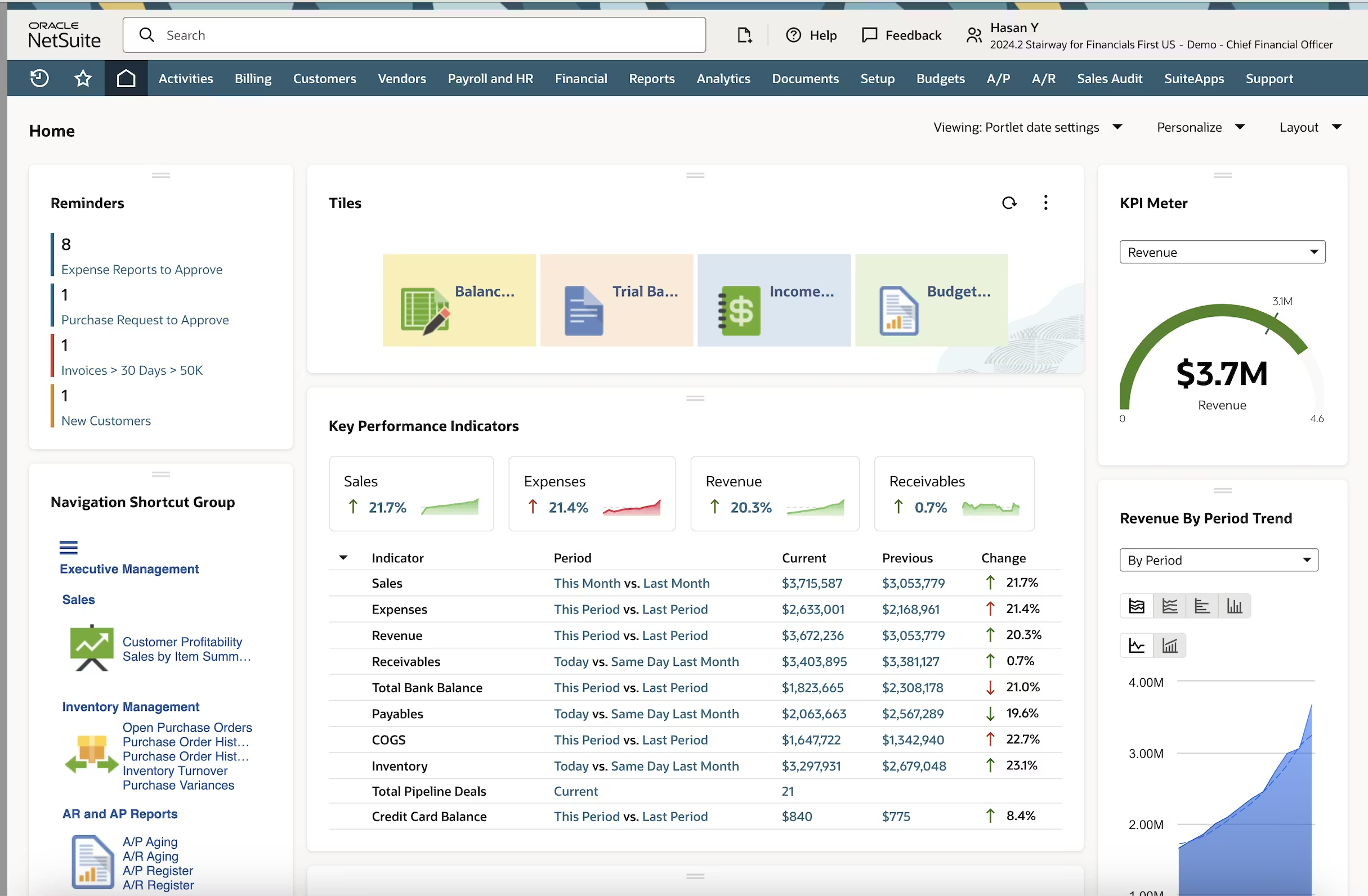
Best for mid-market and enterprise businesses with a large budget, seeking an ERP to centralize their business.
Rating: 4.2/5
Pricing: Contact vendor (but be ready to fork over a lot of money)
NetSuite is a cloud-based ERP solution built by Oracle that brings your financial management, inventory control, and back-office operations into a single, unified system.
If you’re a large business with oodles of cash and near-unlimited resources to invest, then NetSuite could be a good option as you can align your business, as well as most of your other departments, and manage everything from one place.
Core Features
- Multi-location inventory tracking with real-time visibility
- Demand planning and replenishment management
- Lot, batch, and serial number tracking
- Purchase order and supplier relationship management
- Billing, invoicing, and financial reporting
Pros
- NetSuite is a great choice if you want inventory and financial data centralized, and have the budget to spare
- It’s a comprehensive solution, so it can easily scale alongside your business as it grows (regardless of whether that's an increase in volume, users, and operational complexity)
- If you are in a regulated industry, it comes with traceability controls that are well-suited for managing perishable goods
Cons
- As already mentioned, it is going to cost you a pretty penny. Compared to standalone inventory tools, it’s significantly more expensive, with additional costs often tied to modules, users, and support tiers
- Implementation is lengthy and will take multiple quarters to get set up, with you likely needing help from paid consultants or external partners
- The interface has a steep learning curve, and advanced configuration often demands technical expertise
NetSuite Summary
If your business has outgrown entry-level tools like QuickBooks and needs a system that integrates inventory, financials, procurement, and reporting under one roof, NetSuite can deliver that visibility.
But the trade-off is the cost and implementation effort involved, which makes it better suited to businesses that have the time and internal resources to commit to a proper rollout.
3. Katana
Best for small manufacturers selling across multiple channels who want MRP-level production planning without full ERP complexity.
Rating: 4.4/5
Pricing: Free plan available for up to 30 SKUs and 1 location, and paid plans start at $299/month
Katana is a cloud-based MRP system built for small-to-midsize product businesses that sell across multiple channels and locations, covering inventory, order management, purchasing, production, and warehousing in one place with native integrations across leading e-commerce, accounting, CRM, and shipping platforms. On G2, it holds a 4.4-star rating across 109 verified reviews, with users regularly praising its clean interface and manufacturing-specific tools over generic inventory apps.
Core Features
- Live inventory and order syncing across sales channels like Shopify and Amazon
- Bill of materials and production scheduling for discrete manufacturing
- Purchase order and supplier management
- Barcode scanning and shop floor tracking
Pros
- Purpose-built for small manufacturers, not a generic inventory tool stretched to fit production
- Clean, modern interface that shortens the learning curve compared to legacy MRP systems
- Strong native integrations reduce the need for custom connector work
Cons
- Stock is tracked at a single location only, with no native support for splitting inventory across bins or transferring between multiple warehouses
- No BOM versioning, so tracking how a product's recipe or components changed over time requires workarounds outside the system
- Quality checks aren't built in, meaning inspection and non-conformance tracking have to happen elsewhere
- Add-on pricing gets confusing fast — traceability, manufacturing, and warehouse modules are each billed separately on top of the base plan, which can push real monthly cost well past the advertised starting price
Katana Summary
For a small manufacturer selling direct-to-consumer or wholesale across several channels, Katana delivers real production planning without the overhead of a full ERP. The tradeoff shows up as you grow beyond a single warehouse or need more rigor around BOM history and quality control — at that point, the single-location limits and add-on pricing structure start working against you.
SAP Business One Summary
If you’re looking for something to replace your spreadsheets or inefficient inventory management system, and you want something you can slowly implement into your business while having the option to manage your entire business, SAP Business One is a proven option with a long track record.
The downside is, as is typically the case with ERP systems, you’re going to have to spend a lot of time and money upfront to get it working, as well as hiring implementation support. But, if you’re a business looking for a slow and controlled rollout as opposed to a quick and dirty deployment, SAP Business One is worth a look.
4. Odoo
Best for businesses that want to start with inventory and expand into a full ERP over time, and have the technical resources to manage a flexible, modular system.
Rating: 4.5/5
Pricing: Free Community edition and Odoo Online paid plans start at $24.90 per user per month
Odoo is an open-source ERP platform offering a comprehensive suite of business applications — including accounting, inventory management, sales, CRM, HR, and project management — designed to integrate a business's processes into a single system. Odoo Inventory specifically holds a 4.5-star rating across 62 reviews on G2, with its open-source flexibility as the main draw for businesses that want to customize rather than adapt to a vendor's fixed workflow.
Core Features
- Real-time inventory tracking across multiple warehouses
- Barcode scanning and automated replenishment
- Native integration with Odoo's other modules (accounting, sales, CRM) if adopted
- Open API and self-hosting option for full customization
Pros
- Free, open-source Community edition removes licensing cost entirely for businesses with development resources
- Highly customizable — you can shape workflows to your business rather than the other way around
- Scales from a single inventory module into a full ERP without switching platforms
Cons
- Flexible and open-source, but implementation is frequently longer and more expensive than expected — a small team can expect $5,000 to $15,000 in setup costs, and a mid-sized company $15,000 to $45,000, before accounting for custom modules or integrations
- Choosing a paid tier forces you into a bundle of apps you may not need, including CRM and HR, rather than paying only for inventory functionality
- Relies heavily on community and partner support rather than a single dedicated vendor support line, which can slow down troubleshooting for less technical teams
Odoo Summary
Odoo works best for businesses with in-house technical capacity or a trusted implementation partner, since its real value is unlocked through customization rather than out-of-the-box use. Companies without that resource often find the implementation timeline and bundled-module pricing erode the appeal of the free starting tier.
5. Fishbowl Manufacturing
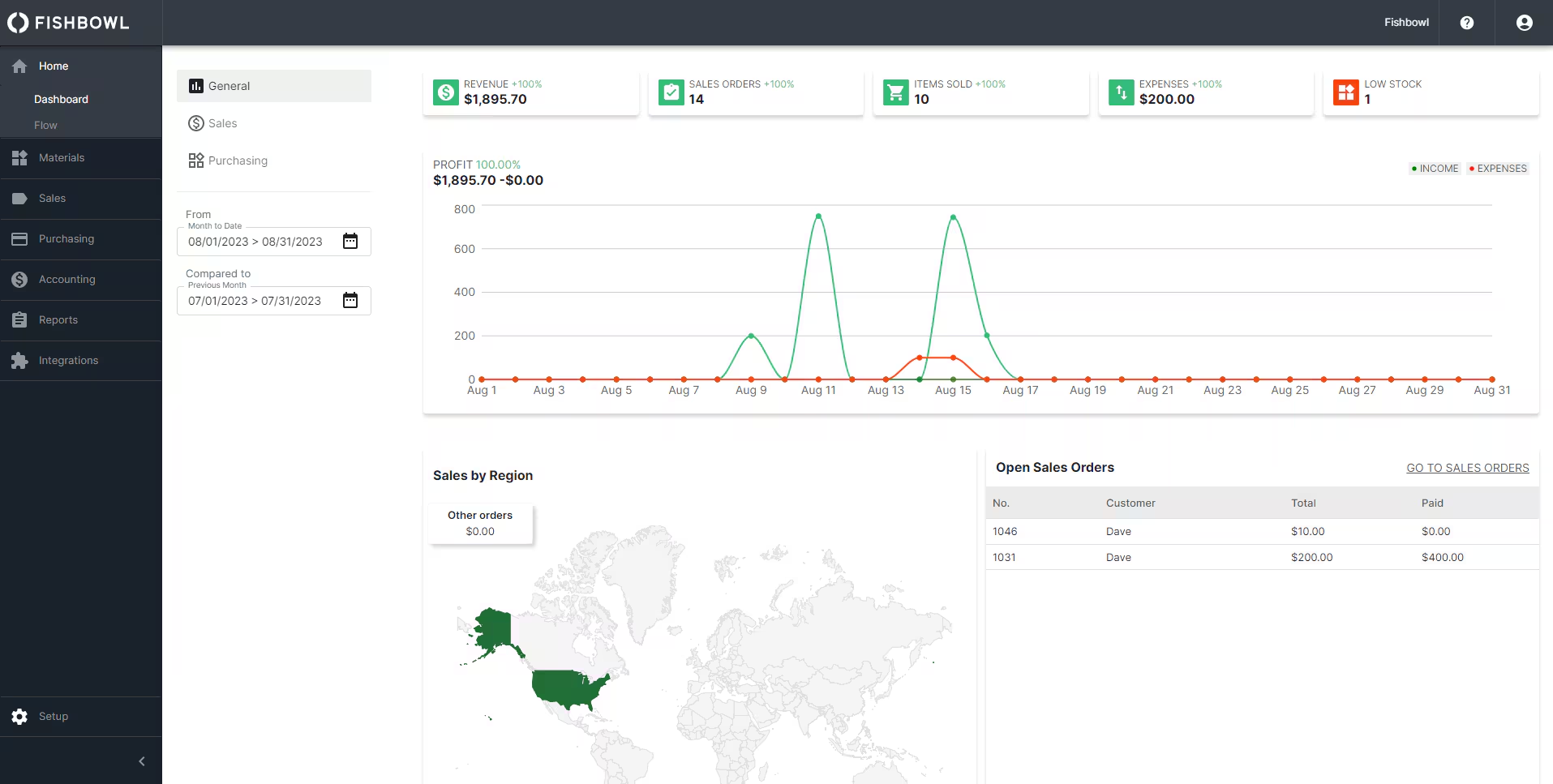
Best for small to mid-sized manufacturers and distributors that need inventory and production management in one place.
Rating: 4.2/5
Pricing: Contact vendor
Fishbowl is an inventory management platform built specifically for small and mid-sized businesses that need more than basic stock tracking.
It handles the full manufacturing and warehouse workflow in a single system, and is particularly well-suited for companies already using QuickBooks or Xero who want to add serious inventory and production capabilities without switching accounting platforms.
Core Features
- Bill of materials (BOM) and work order management for manufacturing workflows
- Barcode scanning and real-time inventory tracking across multiple locations
- Serial number, lot number, and expiry date tracking for full traceability
- Purchase order and sales order management
- Automated reorder points to prevent stockouts
- Integrations with QuickBooks, Xero, Shopify, Amazon, and WooCommerce
Pros
- Strong manufacturing tools, particularly BOM tracking and work order management, make it a practical step up for businesses moving off spreadsheets
- Native integration with QuickBooks and Xero means inventory and financial data can stay connected without a full ERP switch
- Customer support is consistently praised for being responsive and hands-on during implementation
Cons
- Reporting is limited out of the box, and customizing reports often requires additional cost or back-end configuration
- Some users report instability when syncing with QuickBooks, including occasional inventory valuation discrepancies
- The interface can feel dated, and certain workflows require more steps than expected, which slows teams down during busy periods
- Fishbowl is server-based rather than natively cloud-hosted, which means there's no dedicated mobile or tablet experience for teams working the warehouse floor away from a desktop
- The system reserves every part listed on a bill of materials the instant a work order is created, even if those parts are still sitting on the shelf and haven't physically moved — which can make on-hand availability look tighter than it actually is until the order is completed or canceled
Fishbowl Summary
For small manufacturers and distributors that have outgrown spreadsheets but aren't ready to invest in a full ERP, Fishbowl offers a solid middle ground.
It gives you genuine manufacturing and inventory depth at a more accessible price point, especially if QuickBooks is already at the center of your operations. The trade-off is that you'll need to budget time for setup and training, and should go in with realistic expectations around reporting flexibility and integration reliability.
6. Inflow
Best for small wholesalers and distributors who need solid purchase order and multi-location tracking without manufacturing complexity.
Rating: 4.4/5
Pricing: Plans run roughly $110 to $355 per month, with no free tier
inFlow Inventory is an inventory management solution designed for small and medium businesses, covering warehouse management, supplier management, and stock management, built by Archon Systems Inc. It holds a 4.4-star rating across 58 reviews on G2, and is well regarded for straightforward purchase order handling and multi-location stock visibility.
Core Features
- Purchase order and sales order management with automatic stock updates
- Multi-location inventory tracking
- Barcode scanning and reorder point alerts
- Built-in B2B showroom for wholesale ordering
Pros
- Clean purchase order workflow that's fast to learn relative to more complex systems
- Solid fit for wholesalers and distributors who need multi-location tracking without a manufacturing module
- B2B showroom gives wholesale customers a self-service ordering option out of the box
Cons
- Multichannel sync is weaker than competitors — there's no direct Amazon or eBay integration, requiring workarounds for marketplace selling
- Duplicate-name SKU handling can cause mix-ups, particularly for businesses with large or fast-growing catalogs
- Manufacturing support is limited to basic assemblies, with no multi-level BOMs or work orders, so it isn't a fit for businesses doing real production
Inflow Summary
Inflow is a strong fit for wholesalers and distributors whose core need is clean order management and multi-location visibility. It's not the right choice for manufacturers, and businesses selling heavily through marketplaces like Amazon should budget time for workaround integrations rather than expecting native support.
7. Sortly
Best for small teams or field operations tracking equipment and supplies visually, rather than manufacturers or businesses needing production features.
Rating: 4.5/5
Pricing: Free plan available since paid plans start at $49 per month, flat rate
Sortly is a visual inventory management application built to make tracking items simple and accessible from any device, using a visual-first approach where users photograph items, organize them into custom folders, and track everything through a mobile and web app. It carries an overall rating of 4.5, with its ease of use consistently cited as the platform's biggest strength.
Core Features
- Photo-based item tracking with custom folders and tags
- Barcode and QR code scanning from a smartphone
- Multi-location tracking for equipment and supplies
- Offline mode with automatic sync when reconnected
Pros
- Extremely intuitive for teams with no inventory software background
- Visual tracking makes it easy to identify equipment and supplies at a glance, especially useful for field teams
- Free plan makes it accessible for very small operations to start immediately
Cons
- No Bill of Materials or production order functionality — Sortly tracks what you have, not what you're building
- Not a manufacturing tool in any capacity, so it's a poor fit for businesses with production or assembly workflows
- Pricing can climb quickly as inventory volume grows, which works against businesses that are scaling rather than staying flat
Sortly Summary
Sortly is best suited to equipment and supply tracking rather than manufacturing or high-volume inventory management — think tool cribs, IT assets, or field service supplies rather than production floors. For that use case, it's hard to beat on simplicity, but manufacturers should look elsewhere on this list.
Why These Are the Best Picks for Small Businesses
Sutton, Fishbowl, and Katana stand out for small businesses because each fits a different stage of growth without forcing an enterprise-scale investment.
Sutton is the strongest starting point for manufacturers and distributors still running on spreadsheets. It delivers real-time, barcode-driven inventory accuracy alongside purchasing, production, and fulfillment in a system that's live within about 30 days, at a fraction of the cost of a full ERP rollout.
Fishbowl suits businesses that have outgrown basic stock tracking but want to stay anchored to QuickBooks or Xero rather than replace their accounting system outright — its BOM and work order tools give manufacturers real production depth without a full ERP switch.
Katana is the pick for small manufacturers selling across multiple channels who need real MRP-level production planning — live inventory syncing, BOM management, and production scheduling — without taking on the cost or complexity of a full ERP.
Frequently Asked Questions
If you're not sure whether an inventory management solution is for you, here are some questions and answers to help you decide what to get.
What Is Inventory Software for Manufacturing?
Inventory software for manufacturing is specifically built to give businesses that manufacture goods on-site or with a contractor the tools to track and manage raw materials, work-in-progress (WIP), and finished goods throughout the production cycle.
The difference between generic inventory management tools and ones built for manufacturers is that your stock levels are tied directly to production. This means when you create a manufacturing order, materials and subassemblies are automatically committed to production, and inventory levels update to reflect these movements, and the associated manufacturing costs are tracked. Inventory and manufacturing software will typically include features such as:
- Bill of materials (BOM) management
- Production scheduling
- Batch and serial number tracking
- Demand forecasting
Many manufacturers turn to this type of software when they have reached a point where they need to replace their disconnected spreadsheets with a single system that keeps purchasing, production, and inventory aligned in real time.
How to Choose the Right Inventory Management Software
Start by assessing whether you actually need dedicated software yet — if you're a small operation with a modest customer base, a free trial or tool like Veeqo can confirm the need before you commit to a paid platform. From there, match features to your real pain points: multi-location visibility, barcode scanning, or serial and lot tracking if you sell perishables, and Bill of Materials (BOM) functionality if you manufacture goods.
Confirm the software integrates natively with what you already use — your POS, accounting tools like QuickBooks, ecommerce platforms like Shopify or Amazon, and your shipping carriers — and check that it runs well on the operating systems and devices your team relies on day to day.
Test ease of use directly rather than trusting a sales pitch; most vendors offer demos, and a steep learning curve is easier to spot before you buy than after. Research how vendors treat customers post-sale, not just during the pitch, and ask what onboarding actually involves.
Finally, set a clear budget and choose a tier matched to your order volume, getting the full cost — including add-ons like support and hardware — in writing upfront.
What's the difference between inventory software and ERP?
Inventory management software focuses specifically on tracking and managing your stock levels, warehouse operations, and order fulfillment.
An ERP system manages not only your inventory but also the rest of your business, including financials, HR, purchasing, and CRM.
It might sound like ERP is just the best bet when it comes to deciding what you need, but realistically, you need to think about what it is that you want from your software. Inventory tools are faster to implement, less expensive, and purpose-built for stock control. ERPs require significantly more investment and time but handle complex, company-wide operations.
So, if you’re looking to improve inventory visibility, an inventory management system is likely enough. If you’re looking for something to manage your entire business, then ERP is likely the better option.
Can inventory software integrate with QuickBooks?
Yes! The Best inventory software integrates with QuickBooks Online, but some do integrate with QuickBooks Desktop.
Generally, these integrations are there to eliminate manual data entry and keep your books accurate in real time by automatically syncing:
- Inventory levels
- Sales orders
- Purchase orders
- Financial data
Take, for example, Sutton — Sutton offers a native two-way sync with QuickBooks Online and Desktop, automatically creating invoices and bills, updating COGS, and reflecting true inventory values in your financial reports.
What is demand forecasting in inventory management?
Demand forecasting is the process of using historical sales data, market trends, and predictive analytics to estimate future customer demand.
The purpose of doing this in inventory management is to ensure that you have enough stock to meet demand, while avoiding tying up cash in excess inventory, and keeping space free within your warehouse.
If you or your system is properly doing demand forecasting, it will help you prevent two costly problems:
- Stockouts that lose sales and damage customer relationships
- Overstocking that drives up carrying costs and creates dead stock
What is batch tracking and lot traceability?
Batch tracking and lot traceability are inventory management practices that assign unique identifiers to groups of products or materials so you can track them from end to end in your supply chain.
However, even though the names are often used interchangeably, there are slight differences in their functions.
In batch tracking, groups of items are produced or received together under a single record.
In lot traceability links that record specific suppliers, production runs, quality checks, and customers.
By using both, you will have a complete and auditable trail for every item in your facility, enabling you to perform:
- Recalls
- Compliance audits
- Quality control
What Is the Best Inventory Management Software?
Sutton is the best inventory management software on the market today, built specifically for small businesses, manufacturers, and distributors ready to move on from spreadsheets or outdated ERP systems.
It combines the depth of a full ERP (inventory, purchasing, production, and fulfillment) with an interface simple enough for operators and managers to use daily without extensive training. Most teams are fully operational within about 30 days, at a fraction of the cost of a traditional ERP rollout. With real-time, barcode-driven accuracy and consistently high marks for customer support, Sutton earns the top spot on this list.
.jpg)


.jpg)

%20(1)%20(1)%20(1).jpg)